
3 AI Content Marketing Tools That Survived My 6-Month Test
The Problem With Most AI Marketing Tools
Most AI marketing tools do one of two things: promise one feature and barely deliver it, or promise twenty features and deliver none of them properly.
I spent six months testing tools across three categories: AI writing, scheduling and automation, and image and video generation. The goal was simple. Find the best AI tools for content marketing in 2026 that actually move the needle for a small business, not just tools that look good in a demo. What I found was a market full of noise and a very short list of tools worth keeping.
This is that list. But more usefully, it is also the list of what got cut and why, because that is where the real lessons are.
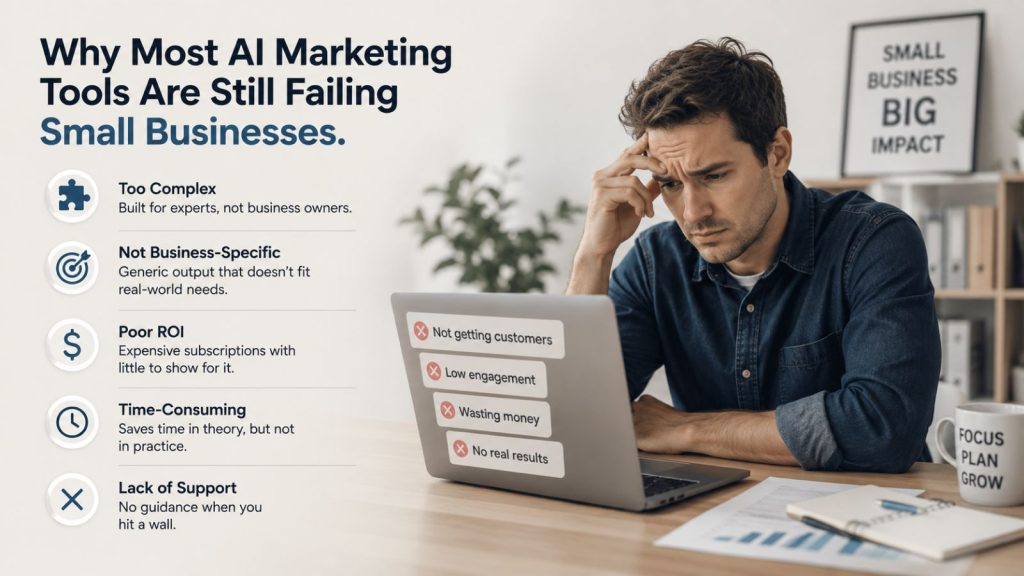
Why Most AI Marketing Tools Are Still Failing Small Businesses
The problem is not that AI tools are bad. Some are genuinely powerful. The problem is that most are built to impress during a free trial, not to fit into a working business.
According to HubSpot, companies that publish content consistently generate 3.5x more traffic than those that do not. The constraint for most small businesses is not strategy or budget. It is time and execution. AI tools should solve that problem. Most of them make it worse by adding complexity, switching costs, and monthly subscriptions to things you use twice and forget.
After six months of testing, I cut my tool list down to three. Everything else got dropped. Here is what failed and why.

What Did Not Make the Cut (and Why)
All-in-One Marketing Platforms
The appeal is obvious. One subscription, one dashboard, everything in one place. The reality is always the same: each function is mediocre, something critical is missing, and you spend more time managing the platform than using it.
There is no such thing as a true all-in-one for content marketing. Writing, scheduling, and visual content creation each require genuine specialisation. The platforms that try to do everything end up doing nothing well. I tested several, found gaps in each, and moved on.
The other risk with all-in-ones is feature bloat. When a platform starts adding features for the sake of adding features, the core product you relied on starts to suffer. If a tool is trying to be everything to everyone, it has stopped trying to be excellent at the thing you actually need.
Generic AI Writers
If an AI writing tool has no information about your business, your voice, your audience, or your offers, it will produce generic content. Full stop.
Some tools market themselves as AI content creation platforms with no way to feed in your specific context, tone guidelines, or business information. The output reads like every other AI article on the internet, because it is. According to Content Marketing Institute, 87% of B2B marketers report that content marketing has helped them create brand awareness. Generic content achieves the opposite. It blends in.
If you cannot spend twenty minutes building context into a tool so it understands your business, the output will never sound like you. Avoid generic AI writers unless they have a genuine way for you to configure your voice, brand, and audience.
Standalone Image Generators
Midjourney is a good product. I used it early on and it does what it says. But as a standalone subscription, it stopped making sense the moment other tools I was already paying for started producing comparable image quality as part of their core offering.
Paying a separate subscription just for image generation is hard to justify when the tools in your stack already handle it. Unless you have a very specific use case that requires Midjourney’s particular style, the standalone image generator category is one to cut.
The Best AI Tools for Content Marketing 2026: The 3 That Made It
These three tools survived because they each do one thing exceptionally well, they integrate cleanly with each other, and together they cover the entire content production workflow without overlap.
1. Claude: The Brain
Claude is the operational layer for the entire system. Not just a chatbot. The real power is in what happens when you configure it properly.
By building out a structured system in Claude, with context files about your business, your brand voice, your content pillars, and your standard workflows, Claude becomes something closer to a department manager than a writing assistant. It knows your business. It produces output that sounds like you, not like a generic AI tool, because you have invested the time to teach it what that means.
In practical terms: I use Claude to write SEO articles directly from video transcripts, build carousels and social captions from raw ideas, plan weekly content sprints, and manage publishing workflows across departments. I have also integrated Codex into the same system, which means I can run both in the same files and directories without switching context.
The €20 per month plan does have usage limits. When running intensive sessions, such as video editing, SEO article production, and multiple pieces of content in sequence, you will hit those limits. The solution is planning your sessions, not upgrading immediately. Know what you are doing before you open Claude, batch the work, and you will get more out of the plan than you expect.
Pro tip: The single most valuable thing you can do with Claude is build a proper context file that describes your entire business, your voice, your offers, and your content rules. Everything you produce from that point will be calibrated to your business rather than produced from scratch every time.
2. Blotato: The Scheduler
Blotato handles content distribution. Everything Claude produces, once reviewed, gets scheduled through Blotato and sent out to all connected platforms automatically.
I have been using it for two months and the simplest summary is this: it does exactly what it says it does. You connect your platforms, you feed in your content, and it publishes on schedule without you touching it again.
In one recent session, I scheduled 66 pieces of content across multiple platforms covering a four-day window: Sunday through Wednesday. That included carousels, image posts, text posts, and reels. All scheduled in one batch. According to Sprout Social, 71% of Marketing Directors and CMOs believe their teams need to increase publishing volume to drive more impact. The gap between that expectation and what social teams can realistically produce manually is exactly what a scheduling tool like Blotato closes.
The calendar view could be improved. Seeing a full month’s content at a glance is harder than it should be when you are working with high volume. Blotato also has AI credits built into its plan for generating images and infographics, which is something worth exploring if you are not already using Higgsfield for that.
Pricing is around €20 to €25 per month depending on your plan. At that price point, it is the easiest decision in this stack.
3. Higgsfield: Images and Video
Higgsfield is where all visual content gets made. Carousels, promotional images, YouTube thumbnails, video content. Everything.
The turning point was when Higgsfield introduced their MCP connection. That integration changed how I work with it completely. Instead of downloading and uploading images manually, the connection means Claude can call Higgsfield directly, pass a prompt and parameters, and get back a finished image without leaving the workflow. That sounds small. In practice, it removes one of the most repetitive parts of the content production process.
Before this system was in place, I would have spent four hours in Canva and still only had the first slide of a carousel finished. With Higgsfield generating the visuals and Claude handling the copy, a full carousel moves from brief to finished files in a fraction of the time.
The pricing is around €28 per month, though I paid annually during a Black Friday sale at a reduced rate. Annual billing is worth considering if you plan to keep it, which I do.
One honest caveat: Higgsfield is adding features at pace. That is mostly a good thing. But there is a risk, as with any platform, of becoming something trying to do everything. The core image and video generation product is excellent. I hope that remains the focus.
To see how you can connect all three tools into a working content workflow, our guide to building your first AI content workflow covers the setup in detail.
How the Three Tools Work as a System
The tools only create real value when they are connected. Here is how the workflow runs in practice.
- Input arrives. This could be a video transcript, a live recording, a brief, or a raw idea. It goes into Claude.
- Claude processes the input. Depending on the content type, Claude extracts the key insights, structures them into the right format, and produces the copy. For a transcript, that means an SEO article, a set of social captions, and a carousel brief. For a live recording, it means cutting the recording into short clips via a video editing workflow, transcribing into an SRT file, and then feeding that SRT back into Claude for repurposing.
- Higgsfield creates the visuals. Claude passes the carousel brief or image prompt to Higgsfield via the MCP connection. Higgsfield returns finished visual assets.
- Blotato schedules everything. The finished content, copy and visuals together, goes into Blotato. Platform-specific captions are loaded, scheduling slots are assigned, and everything publishes automatically.
One recorded live session recently produced a full SEO article, six to twelve short video clips, a lead magnet, and a carousel. All from a single input. That is what a connected system looks like versus a collection of individual tools.
If you want to understand the broader approach to building a budget AI tool stack, our breakdown of affordable AI tools for small business covers the options in more detail.
The Cost Breakdown
Total monthly spend for this system:
- Claude: €20/month
- Blotato: approximately €22/month
- Higgsfield: approximately €28/month (or less on annual billing)
Total: approximately €70/month. Less if you buy Higgsfield annually.
For that, you get an AI brain that runs your content operations, a scheduler that distributes everything automatically, and a visual content generator that produces images and videos to a professional standard. The output this system produces in a single session would cost significantly more if you were paying an agency or a freelancer to do it manually.
How to Start (Without Making the Same Mistakes)
The biggest mistake people make with AI tools is adding too many at once.
I fell into this exact trap. At one point I had subscriptions to dozens of tools, none of them configured properly, and the cognitive load of managing all of them was greater than the problem they were supposed to solve. I ended up with expensive subscriptions and nowhere to focus.
The right order is:
- Identify your actual biggest time drain in your content workflow. Be specific. Is it writing captions? Creating images? Staying consistent with posting?
- Pick the one tool that solves that specific problem. Set it up properly. Use it until it is genuinely embedded in how you work.
- Add the next tool only when the first is working reliably.
Three tools. Six months. This is what survived that process.
Frequently Asked Questions
What are the best AI tools for content marketing in 2026?
The three tools that have proven most effective in real-world testing are Claude (for AI-powered content strategy and writing), Blotato (for social media scheduling and distribution), and Higgsfield (for AI image and video generation). Together they cover the full content production pipeline for around €60 to €70 per month. Each tool specialises in one function and integrates with the others, which is what separates them from all-in-one platforms that try to do everything and do nothing particularly well.
Is Claude better than ChatGPT for content marketing?
Claude performs better for content marketing when properly configured because it maintains consistent context across long sessions, handles large documents well, and produces output that is easier to calibrate to a specific voice and brand. That said, neither tool works well out of the box without proper setup. The investment is in building the context and system around whichever tool you choose. ChatGPT with a well-configured custom GPT can also work. Claude is the tool I use and the one I am recommending here based on six months of real use.
How much should a small business spend on AI marketing tools?
A realistic and effective AI content marketing stack for a small business runs between €50 and €80 per month, depending on the tools and billing cycles. The approach that works is picking a small number of specialist tools rather than one expensive all-in-one platform. Three focused tools at €20 to €30 each outperform a single platform at €100 per month in almost every case, because you are not paying for features you do not use.
What AI tools are worth avoiding for content marketing?
Avoid all-in-one AI marketing platforms that claim to handle writing, scheduling, design, analytics, and SEO in a single subscription. The breadth comes at the cost of depth. Also avoid generic AI writing tools with no way to configure your voice, brand, or business context. The output will be indistinguishable from every other AI-generated article on the internet. Standalone image generators like Midjourney are worth avoiding if you are already paying for a tool that generates images as part of its core offering.
If you want to keep up with how this system evolves and get access to the workflows, templates, and guidance behind it, join our membership and get ongoing support as the stack changes.