
How much of your Claude limit is gone before you ask a single question? On my setup, the answer was 45,100 tokens. That is the Claude Code context loaded into a fresh chat before I had typed a word. Every bit of it travels with every message I send.
I run my whole business through Claude Code, and I still hit the limit. So I stopped guessing and used the built-in commands to look. Here is where the tokens actually go, which fixes made a real difference, and the one popular command that helps less than it looks.
Why you hit the limit: it is not the work
Most people do not run out of Claude because they work too hard. They run out because of what Claude carries into every message. Each time you send something, Claude re-reads the whole chat from the top. So a long session is not one big job; it is the same conversation sent again and again, getting heavier each time.
Think of a new assistant who has to re-read the entire email thread before answering each line. The thread is the cost, not the answer.
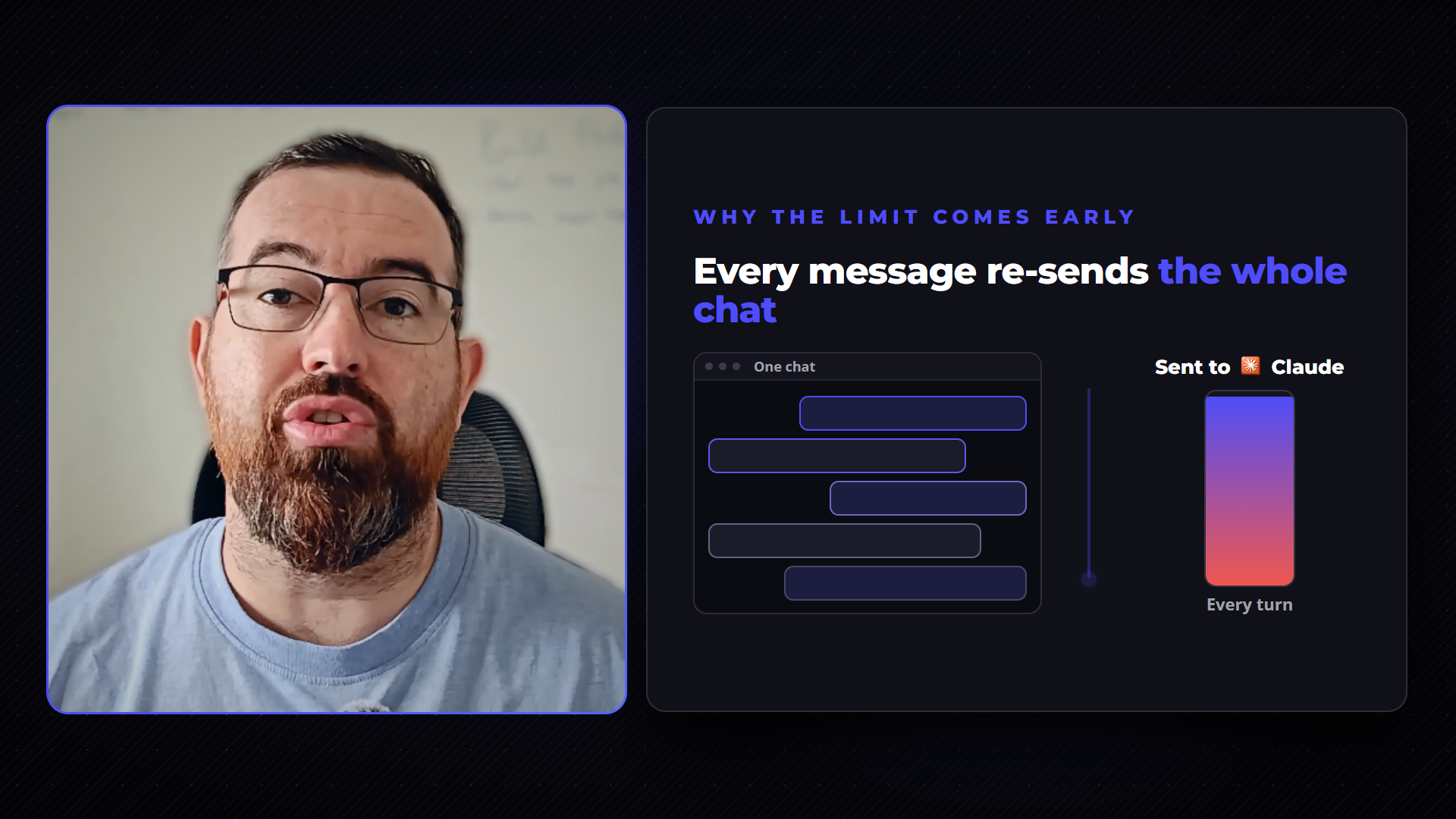
I found this out the hard way on one of my long-form video edits. That single run used about 152 million tokens, and 97% of them were Claude re-reading the conversation. Not the editing. The re-reading. I was so focused on the job that I never watched what the chat was carrying.
So the fix is not "use it less". It is carry less, and stop paying Claude to re-read things it does not need.
What loads into Claude Code context before you type
The first command to run is /context. Open a fresh chat, type it before you ask anything, and it shows everything Claude has already loaded, as a coloured grid.
Anthropic's commands reference describes it as a way to "visualize current context usage as a colored grid", with optimisation suggestions for context-heavy tools, memory bloat and capacity warnings. Add all (so /context all) to expand the breakdown item by item.
Here is what mine showed on the morning I filmed:
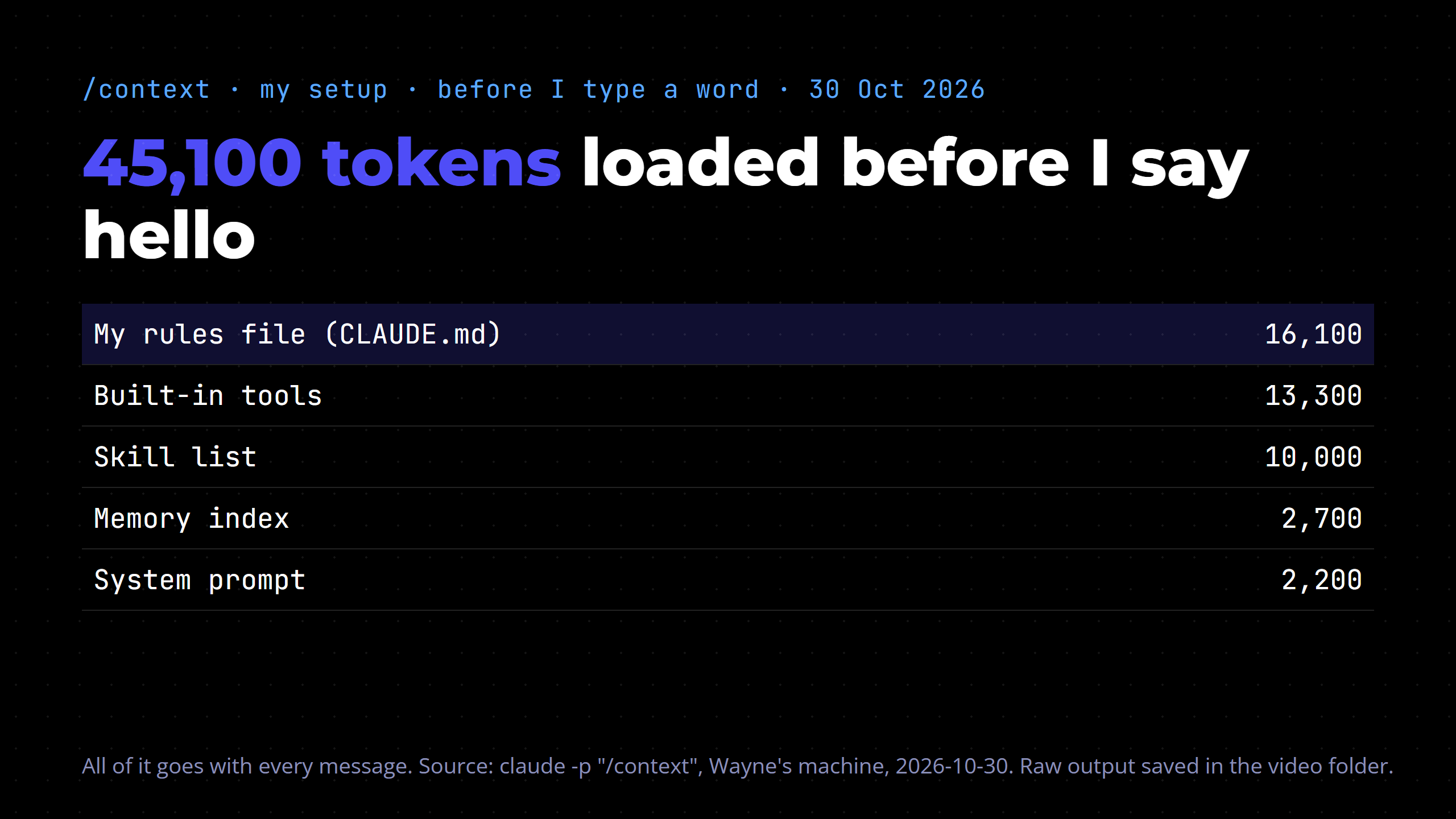
- My rules file (CLAUDE.md): 16,100 tokens
- Built-in tools: 13,300 tokens
- The list of skills: 10,000 tokens
- My memory index: 2,700 tokens
- System prompt: 2,200 tokens
The biggest single item was my own rules file. Because I run the business through it, it had grown huge. Worse, /context showed me duplication I had never noticed. My brand rules sat in one place, and a separate tone guide for content sat in another, saying much the same thing.
The two numbers people misread
First, the report also lists "MCP tools (deferred)" at 386,000 tokens on my machine. Deferred means those tools are not loaded until something calls them, so that line is not part of the 45,100. Do not panic about it.
Second, not every message costs full price. While a chat is "warm", the re-read is cached and much cheaper. Once it goes cold, the next message re-sends the lot at full rate. More on that below, because it changes when you should start a fresh chat.
What I changed
After /context, I merged the duplicate brand files and cut repeated rules out of CLAUDE.md. As a result, every conversation now starts lighter, and every message after that is cheaper too. Of all the commands here, this one gave me the biggest benefit.
/skill-doctor: useful, but it flags the wrong skills
If you are like me, you install every skill that looks handy. /skill-doctor lists them all: what each costs in context, how often you use it and when you last did. Anthropic's skills documentation is blunt about why this matters: "Every skill in the skill listing adds to your context on every turn, whether or not Claude ever uses it."
My report: 78 skills loaded, 39 never used once. Nineteen of those 39 came from syncing claude.ai, not from anything I installed myself.
Where it breaks
Here is the part nobody says. Most of those 39 unused skills cost under 20 tokens each in the listing, and the heaviest only a couple of hundred. Switching them all off barely moves the needle. DIY Smart Code found the same thing independently: 64 unused skills costing under 1% of their context.
In contrast, the real weight was in the skills I use every day:
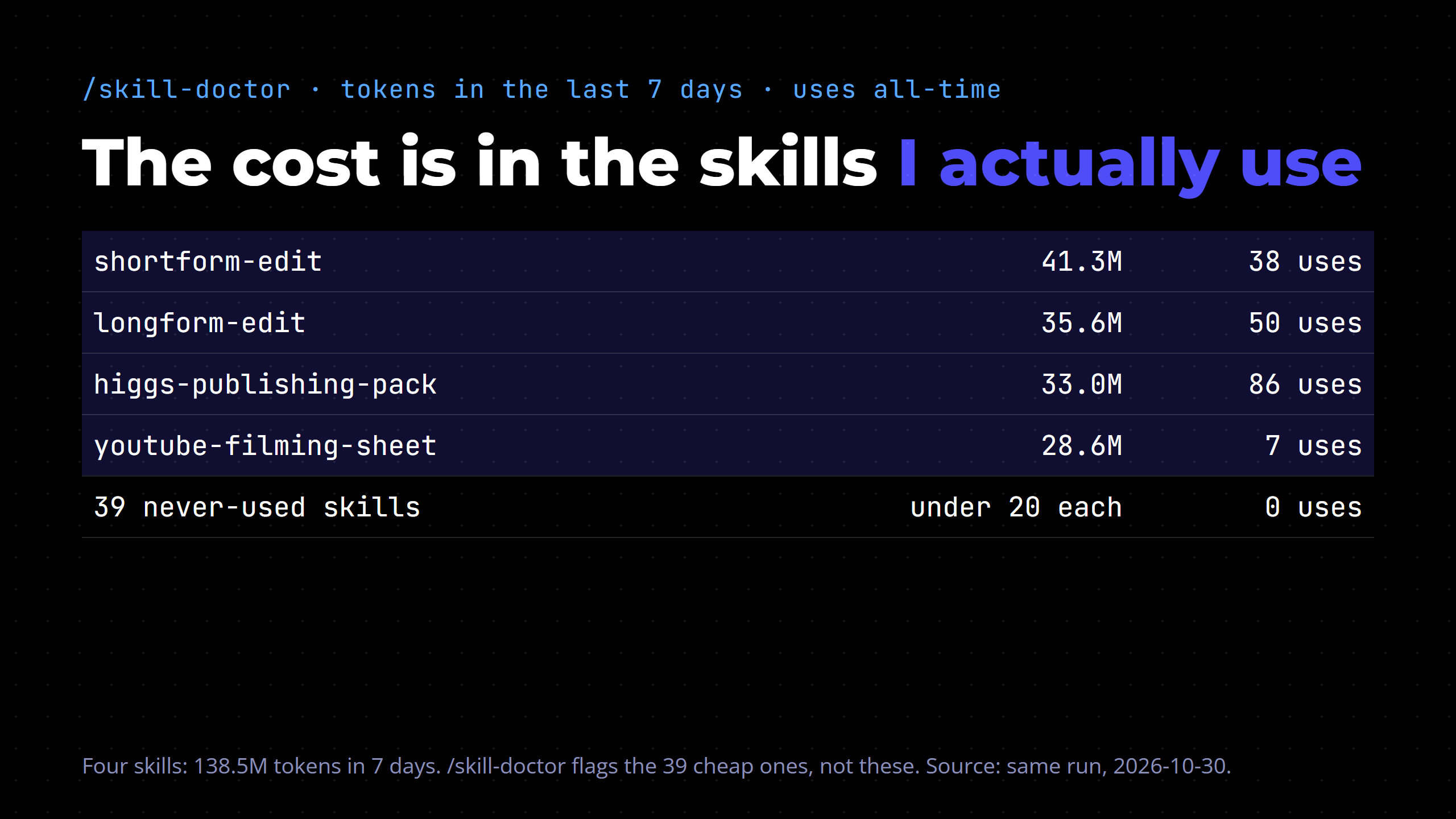
My short-form edit skill alone used 41.3 million tokens in a week. Together, four skills used 138.5 million. /skill-doctor does not flag those, because they are in use.
So clear out the junk, because it is free tidying. Then look hard at the skills you run most. That is where your limit goes.
Pro tip: /skill-doctor shows you; it does not switch anything off. Turn skills off in /skills. For skills synced from claude.ai, turn them off on claude.ai itself, or the next sync downloads them again.
/doctor: a checkup for your whole setup
/doctor checks your installation, settings, add-ons and your CLAUDE.md file. According to Anthropic's commands reference, it "proposes fixes that Claude applies after you confirm", so it reports first and asks before it changes anything.
When I ran it, it found a real problem. A lot of my working material had been saved only in memory. The memory was filling up, and older details were slowly being forgotten. I moved that material into proper files where it belonged.
There is also a newer mode, /doctor prompt-audit, which needs Claude Code v2.1.283 or later. It looks for instructions written for older models. If you set your rules up a year ago, they may be telling today's model things it no longer needs. You pay for every one of those lines on every message.
I now run /doctor roughly once a week to keep things clean and make sure everything is filed in the right place.
/advisor: a cheap model most of the time, a strong one when it counts
For my long-form edits, I use /advisor. The idea is simple: a cheaper model such as Sonnet does the routine work, and a stronger one such as Opus checks in at key moments. Think of a junior doing the job and a senior stepping in for the hard calls.
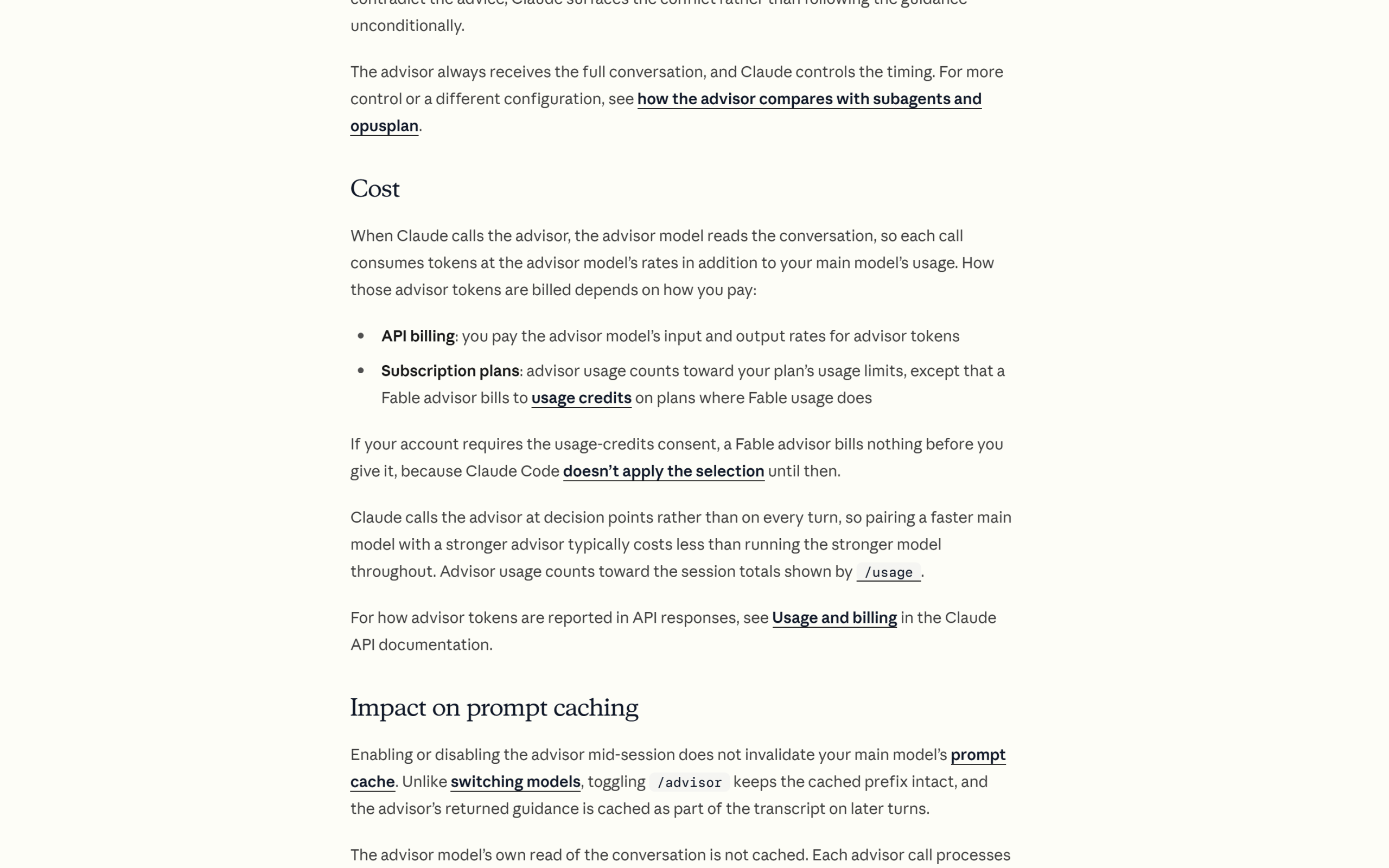
Anthropic's advisor documentation lists "Sonnet main + Opus advisor" as a standard pairing. It also says that pairing a faster main model with a stronger advisor "typically costs less than running the stronger model throughout."
The honest part
Two catches matter for your limit. First, Claude decides when to call the advisor, not you; the timing is model-driven rather than rule-based. Second, each advisor call reads the full conversation at the stronger model's price, and that read is not cached. The feature is also labelled experimental.
Therefore, /advisor suits long, multi-step jobs where most turns are routine. For quick questions, it is not worth switching on.
/rewind and /recap: stop starting over
When Claude goes the wrong way, most people pile more messages on top to correct it. However, every one of those messages becomes more chat to re-read on every turn after.
/rewind takes the conversation back to an earlier point instead, like an undo button. It also works as /undo or /checkpoint, and pressing Esc twice opens the same menu, but only when the prompt box is empty. If you have text typed, Esc twice clears the draft instead.
/recap gives you a one-line summary of the session on demand. After a long brainstorm, it tells you where you are without you re-explaining the whole job.
There is a related safety net too. Anthropic's changelog for version 2.1.304 (19 October 2026) added a warning on Pro and Max plans "when resuming an inactive conversation would use a noticeable share of your 5-hour usage limit". It offers to start a new conversation instead.
Two free mods that show what Claude is spending
Commands show you a snapshot. These two free mods (add-ons that change how Claude Code looks) show you what is happening while it happens.
savvy-progress: see every agent on a long job
On a big job, Claude splits the work across helpers called subagents. Normally you see a spinner and hope. My long-form edit spins up five or six of them: one editing, one on motion graphics, one writing the article.
savvy-progress is a free mod by Eugene (@savvyntsev). It puts a progress bar above the chat box and a panel on the right listing every helper. For each one you see its model, how far along it is, how full its context is, a rough cost and how long it has been running. The cost figure is an estimate built from token counts, not a bill.
It matters for your limit because subagents can burn far too many tokens when the brief you give them is too broad. When you can see one wandering off, you can stop it before it eats your week. Install it with two lines, then restart:
/plugin marketplace add johnnyvizz/claude-kit/plugin install savvy-progress@claude-kit
After that, /agents-info opens and closes the panel. The code is MIT-licensed and lives in the claude-kit repository.
Ribbon: usage left, and whether your chat is warm or cold
I found Ribbon on Jay E's RoboNuggets channel and grabbed it straight away. Before, I was constantly typing /usage to check where I stood. Now a slim bar above the chat box shows how much of my 5-hour window and 7-day window is left.
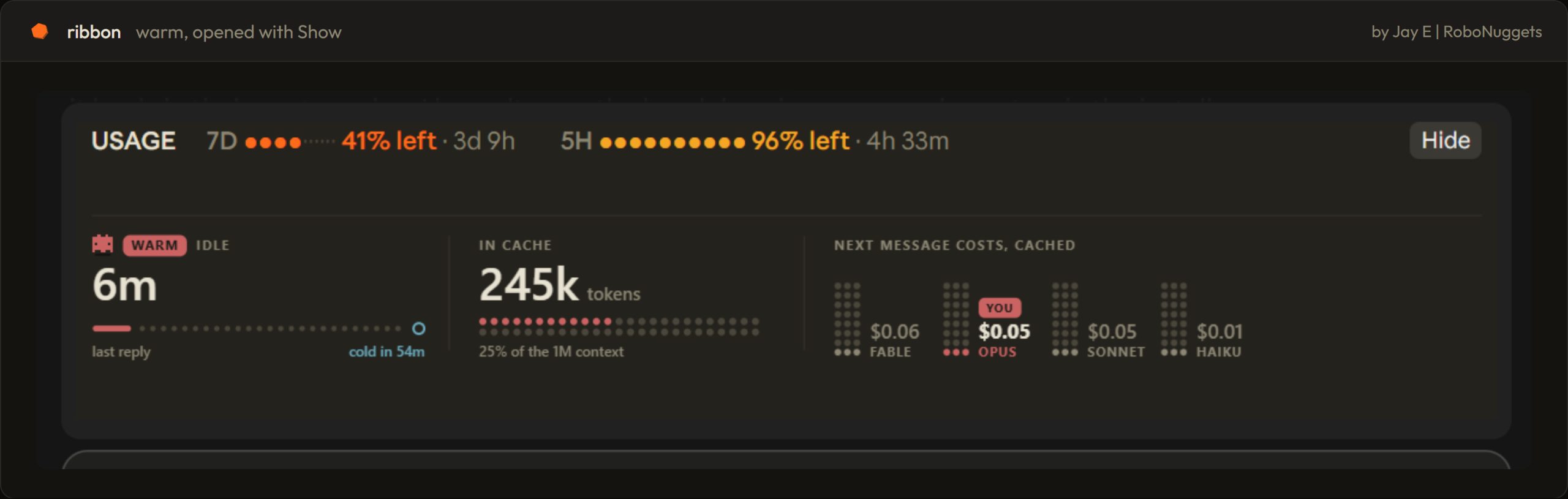
The best feature is the warm and cold indicator. While the chat is warm, the next message is cheap. Once it goes cold, the next message has to re-send the whole conversation at full price. Ribbon shows you that price before you send. In other words, it tells you when a conversation is finished and a fresh chat is the cheaper move.
Install it with /plugin install ribbon --marketplace robonuggets/ribbon. It is free and MIT-licensed on Jay E's GitHub page. As with any mod, it runs with your permissions, so only install from people you trust.
Three quick wins
/output-style concise: shorter answers that lead with the result, so there are fewer words out and less to re-read later. The built-in styles are Proactive, Concise, Explanatory and Learning. If you want an "explain it like I'm five" style, that is a custom style you write yourself./insights: an HTML report on how you actually use Claude Code, where things go wrong and features to try. Note that it uses some of your limit to generate.- Idle compaction: version 2.1.314 added this to VS Code and the Desktop app's Code tab. A conversation over 200,000 tokens that you leave idle gets summarised, so coming back after lunch costs less once the cache has expired.
Your Claude Code context checklist for this week
If you only do three things, do these:
- Open a fresh chat and type
/context. See what loads before you type a word, then trim your rules file and merge any duplicate brand or tone files. - Run
/skill-doctor. Switch off what you never use, then look hard at the skills you use most, because that is where the real cost sits. - Running long jobs? Install savvy-progress. You cannot see what your agents cost if you cannot see your agents.
Who should not bother? If you use Claude in the chat window a few times a day and never hit a limit, skip all of this. It is for people running Claude Code on real work every day. Most of us do not need a bigger plan; we need to stop paying Claude to re-read things it does not need.
Want help setting this up on your own system? I walk members through it inside The AI Marketing Hub, and you can start with a 7-day free trial. For a live side-by-side test of a plugin that trims code output, see my guide on how to cut Claude Code token usage.
Frequently asked questions
What is Claude Code context?
Claude Code context is everything Claude reads on each turn: the system prompt, built-in tools, your CLAUDE.md rules file, memory, the list of skills and the whole conversation so far. On my setup, 45,100 tokens loaded before I typed anything. All of it is sent again with every message, which is why a heavy setup drains your limit faster.
How do I see my Claude Code context usage?
Type /context in a Claude Code session. It shows a coloured grid of what is loaded and suggests fixes for heavy tools and memory bloat. Use /context all to expand the per-item breakdown. Run it in a fresh chat before your first message to see your baseline cost, then again mid-session to see how much the conversation itself has added.
Does /skill-doctor reduce my token usage?
Not on its own. It reports what each skill costs in context and how often you use it, but you switch skills off yourself in /skills. Unused skills are usually cheap, often under 20 tokens each in the listing. The bigger savings come from looking at the skills you use every day, which can run to tens of millions of tokens a week.
Is it cheaper to start a new chat in Claude Code?
Often, yes. While a chat is warm, re-reading it is cached and cheap. Once it goes cold, the next message re-sends the whole conversation at full price. If a long chat has gone cold and the job is done, a fresh chat with a one-line summary from /recap usually costs less than carrying on.
Disclosure: Some links in this article are referral links. If you use one, I may earn a commission at no extra cost to you. I only link to tools I actually use.
How this was made: The facts, numbers and examples in this article come from my own work and videos. I use AI to help draft and structure the writing, then I review and edit every line myself before it goes live.

About the author
I'm Wayne St Ledger, and I run St Ledger Marketing. I started out in construction as a plasterer, then went on to a Bachelor's in Marketing and a Master's in International Business, which is where my bias toward results over talk comes from. I help business owners build marketing systems they actually understand, using AI in grounded, practical ways rather than hype. I also run a YouTube channel on marketing and AI, and The AI Marketing Hub, my own community for business owners and marketers putting AI to work properly.