What if the keyword that won your video on YouTube is the reason its article never shows up on Google? That was my problem for months. The DataForSEO MCP fixed it, because it lets Claude Code ask Google's own search numbers a question in plain English before a single word of the article is written.
This guide covers what DataForSEO is, what it costs, how to connect the DataForSEO MCP to Claude, and the exact four-step check I run on every video before it becomes an article. It also covers where the numbers mislead you, because they do.
Why Your YouTube Keyword Fails on Google
YouTube and Google are searched by different people using different words. A phrase that pulls thousands of searches on YouTube can pull almost none on Google, so an article written on the YouTube keyword targets a phrase nobody types. The fix is to keep the video's topic and pick a fresh keyword for the article.
Here is the example that convinced me. A couple of weeks before writing this, I published a video about Claude Opus 5.5 editing my videos. At the time, "claude opus 5.5" was the phrase everyone was searching on YouTube, so that was the video's keyword. Google, however, had no data at all for that phrase.
The article went out on "claude video editing" instead. That phrase gets 320 searches a month in the US at a difficulty of 2. In the 28 days to 30 October 2026, the article earned 19 clicks and 2,364 impressions at an average position of 7.4. Those are small numbers. They are also real, and they keep arriving without me posting anything.
Two Tools, Two Jobs
I use two research tools side by side, and each one has a single job:
- VidIQ tells me what people type into YouTube. It picks the video's title keyword, before I film.
- DataForSEO tells me what people type into Google: monthly searches, how hard the phrase is to rank for, and what the searcher wants. It picks the article's keyword, after I film.
Use the YouTube tool for both jobs and you end up writing articles nobody searches for. In other words, the video and the article share a topic, not a keyword.
What DataForSEO Is and What It Costs
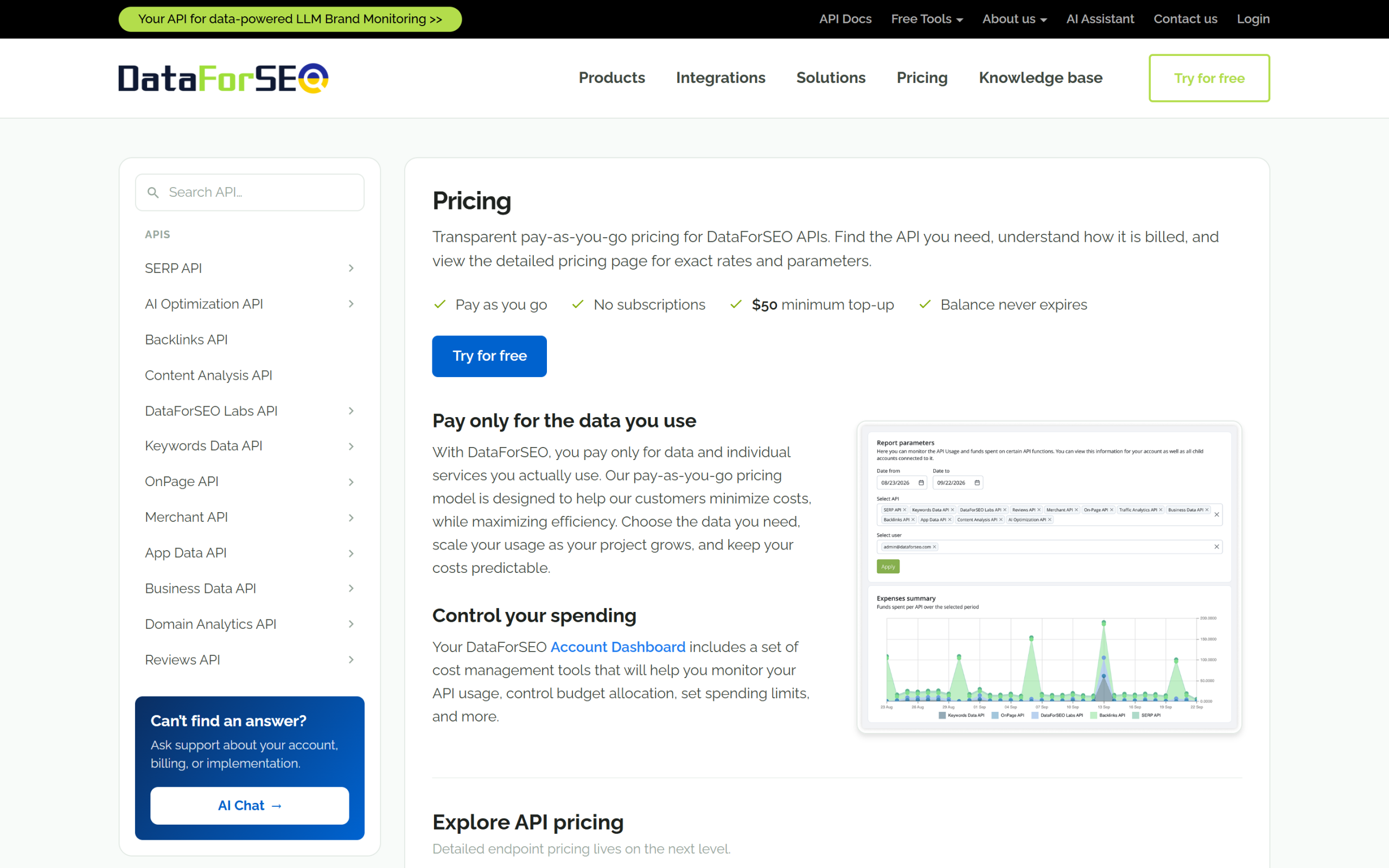
DataForSEO is a pay-as-you-go data provider. It sells the same kind of keyword and search results data that the big SEO platforms show you, but you pay per request instead of per month. That pricing model is the main reason I use it as a small business owner.
According to DataForSEO, the model is pay as you go with "no subscriptions or recurring fees". The minimum top-up is $50, and the balance never expires. New accounts also get a $1 trial credit, which goes a surprisingly long way for testing.
DataForSEO Pricing per Keyword Call
The calls I make most often come from DataForSEO Labs, the keyword research part of the service. DataForSEO's Labs pricing page lists the live rate at $0.012 per task plus $0.00012 per item returned. So a request that returns 50 keyword suggestions costs about $0.018.
Compare that with a subscription tool. Semrush lists its entry SEO plan at €134 a month on monthly billing, or €112.52 a month billed annually. I have used Semrush before and found myself locked into monthly plans I did not get the use out of. For one keyword decision per video, paying per question makes far more sense.
Pro tip: keywords DataForSEO has no data on are simply left out of the reply, and its API documentation says you are not charged for them. That empty result is useful information in itself, as you will see below.
How to Connect the DataForSEO MCP to Claude Code
The DataForSEO MCP is a server that connects Claude to DataForSEO's data, so you can ask for keyword numbers in plain English instead of writing API calls. Setup takes four steps: create an account, get your API login, add the MCP with one command, then run a test call to confirm it works.
MCP stands for Model Context Protocol. The Model Context Protocol project describes it as "an open-source standard for connecting AI applications to external systems", and compares it to a USB-C port for AI applications. DataForSEO's own page calls its server "a bridge between your AI model and DataForSEO APIs".
Step 1: Create an Account and Get Your API Login
Sign up at DataForSEO and claim the trial credit. Then open the API Access section of your dashboard. That is where your API login and password live. You need both for the connection.
Step 2: Add the MCP Server
DataForSEO publishes a help centre page with the install command for Claude Code. The easiest route is to give Claude that help page and ask it to make the connection for you. Next, it will ask where to put your login details.
Never paste your API key into the chat. Enter it yourself, in the place Claude points you to. The login header is your email and API password encoded in Base64, and Base64 is not encryption, so anyone who sees it can decode it.
If you use the Claude desktop app rather than Claude Code, you can add DataForSEO through its MCP connector settings instead. DataForSEO offers both a remote server (nothing to install) and a local one that runs through npx and needs Node.js 18 or later.
Step 3: Check It Is Connected
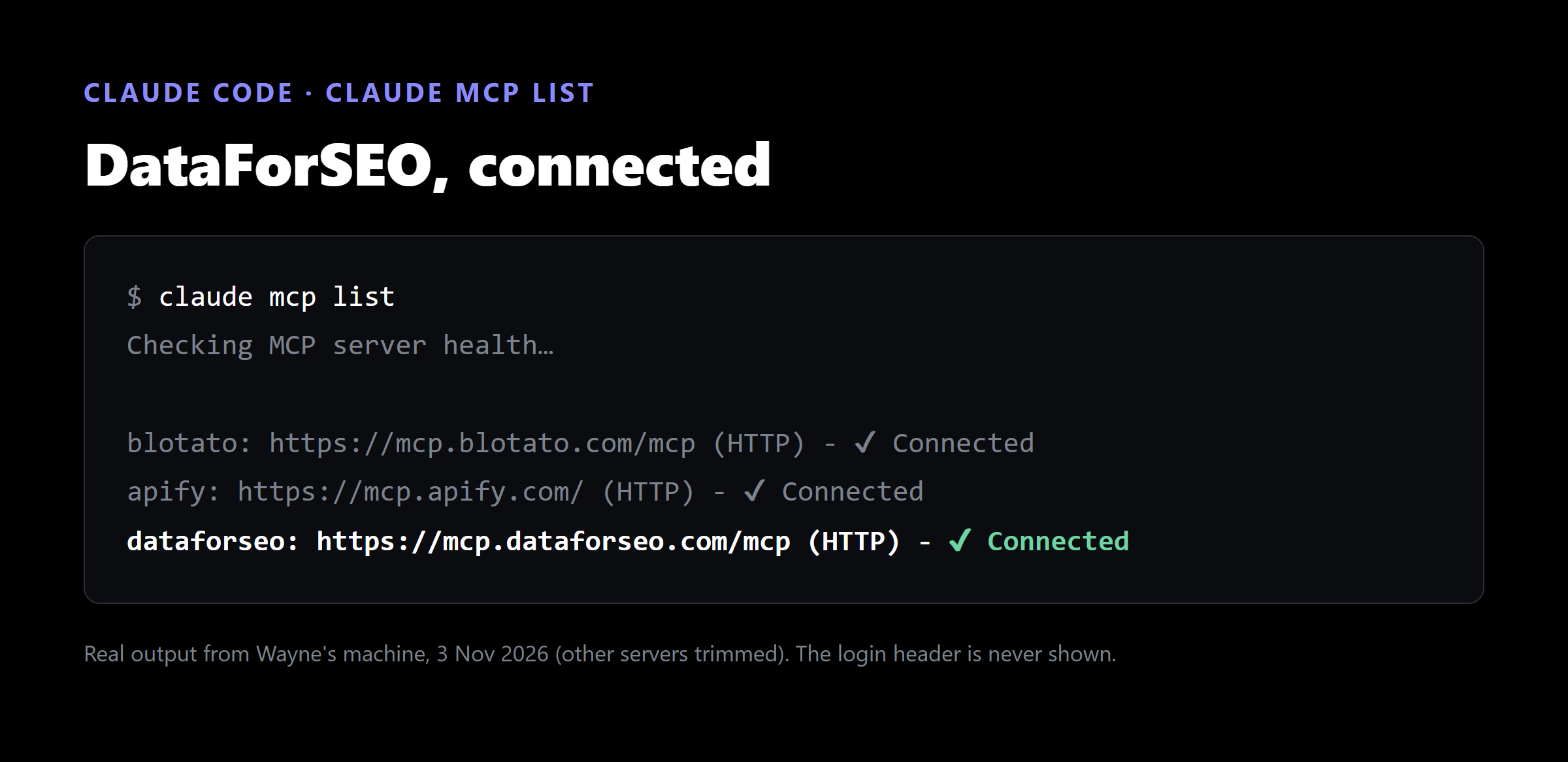
In Claude Code, run claude mcp list, or type /mcp inside a session. You should see "Connected" next to dataforseo. If it is not connected, you may need to authorise it again.
Step 4: Run a Test Call
Finally, ask Claude to look up a few general keywords. If numbers come back, everything works. My own test used four phrases. Two came back with data. The two that came back empty were my YouTube keywords, "claude opus 5.5" and "claude jarvis". That one test makes the whole point of this guide.
The DataForSEO MCP Keyword Workflow, Step by Step
Once the DataForSEO MCP is connected, picking an article keyword is a repeatable process. Check Search Console first, then ask DataForSEO for related phrases, bin the ones with the wrong intent, and check the survivor against your own site. The worked example below is my Facebook Ads video.
That video was about running Facebook ads on a small budget. Its YouTube keyword was "facebook ads small budget", which VidIQ showed at 4,240 searches a month on YouTube. On Google, the same phrase gets about 10. As a result, an article written on it would have been aimed at almost nobody.
1. Check Search Console First
Search Console shows the phrases your site already appears for on Google. If a phrase on your video's topic already earns impressions and no page targets it, that is the cheapest win available. Claude Code checks this before anything else.
For Facebook ads there was nothing, because my site had never covered ads. So the search moved on to DataForSEO.
2. Ask DataForSEO for Related Phrases
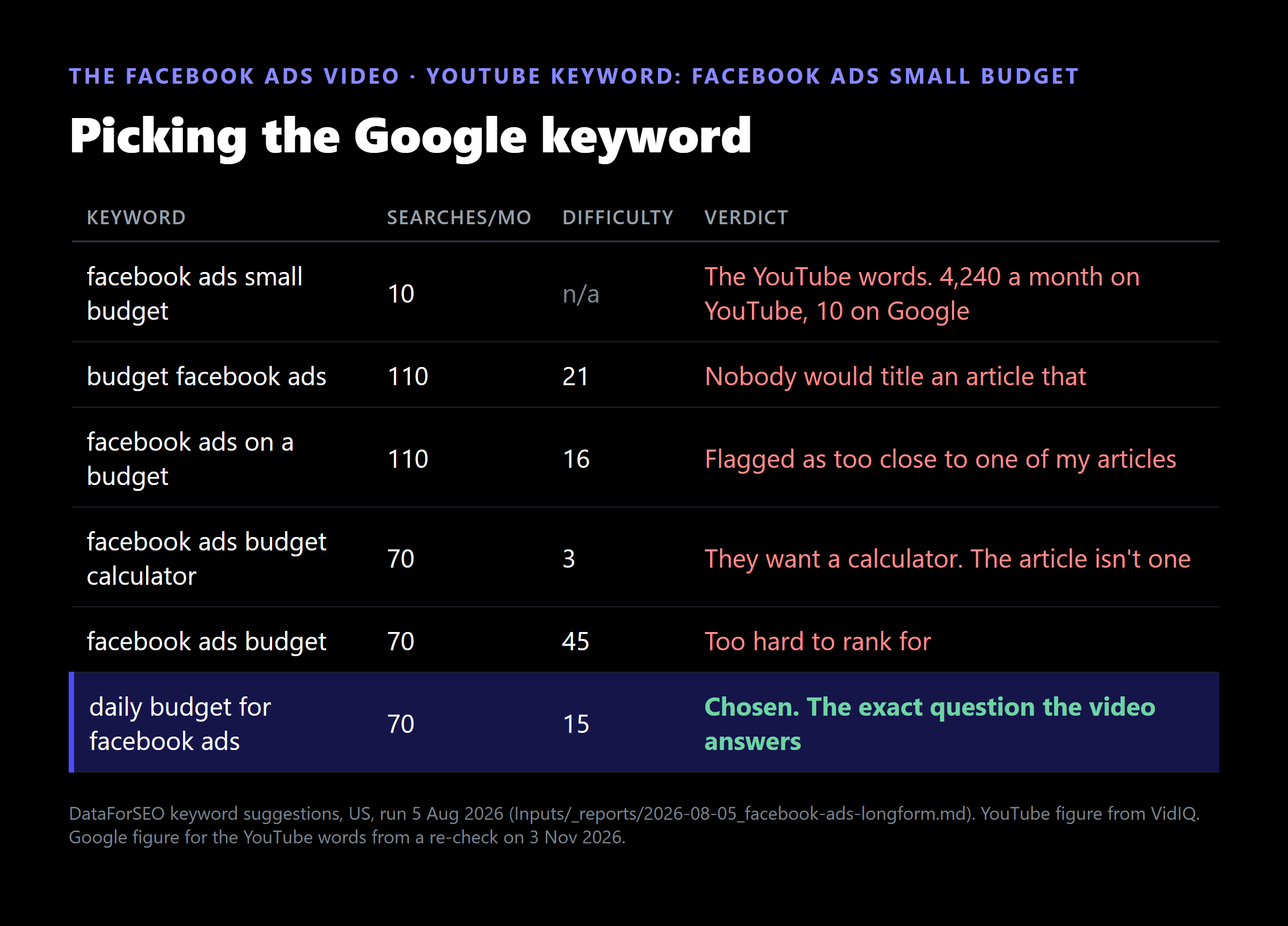
Next, Claude Code asks the DataForSEO MCP for every related phrase containing the topic, with three numbers for each: searches per month, keyword difficulty and search intent. It hands back a table, and it adds a verdict on each row.
3. Bin the Wrong Ones
This is the part that still needs a human. Go down the list and remove anything that does not match what the video actually delivers:
- "budget facebook ads" (110 a month): nobody would title an article that way.
- "facebook ads budget" (70 a month, difficulty 45): too hard to rank for at my site's size.
- "facebook ads budget calculator" (70 a month, difficulty 3): easy to rank, but those people want a calculator, and the article is not one.
Search intent decides everything here. You need to write the phrase the way your customer would type it. A keyword with a thousand searches a month does more harm than good if the reader lands, sees the wrong content and leaves.
4. Check It Against Your Own Site
Before locking anything in, Claude Code checks the candidate against every article already on the site. There is no point targeting a phrase you already target, because two of your own pages end up competing with each other. "facebook ads on a budget" (110 a month) was flagged at this step as too close to an existing article.
The pick was "daily budget for facebook ads": 70 searches a month at a difficulty of 15 when I picked it. It is the exact question the video answers, namely how much to spend per day. In the 28 days to 30 October 2026, that article appeared on Google 1,012 times.
For more on the thinking behind this step, see our guide to keyword research for a blog. This is now how every new article gets its keyword, and 25 of them so far have come from DataForSEO.
From Locked Keyword to WordPress Draft
With the keyword locked, Claude Code writes the article from the video's transcript and the filming sheet I recorded from. It does not invent a random article around the keyword. Most of the context, the research and the examples come straight from what I said on camera.
That has a consequence worth knowing. If I make a mistake in the video, the mistake can carry into the article. I accept that, because the article reflects my own knowledge at the time. However, it is exactly why the next step exists.
The system adds the tags and images, embeds the video, and uploads everything to WordPress as a draft. Nothing publishes itself. I read every draft, fix what is wrong, and then publish or schedule it. You will find mistakes, and that is part of the process. I stay the human in the loop on purpose.
What the Results Look Like
Does Google punish this? On my site, the evidence says no. The Claude video editing article sits at position 7.4. Across the whole site, the last three months brought 166 clicks and 34,800 impressions from Google, and the impressions line rose steadily from August to the end of October.
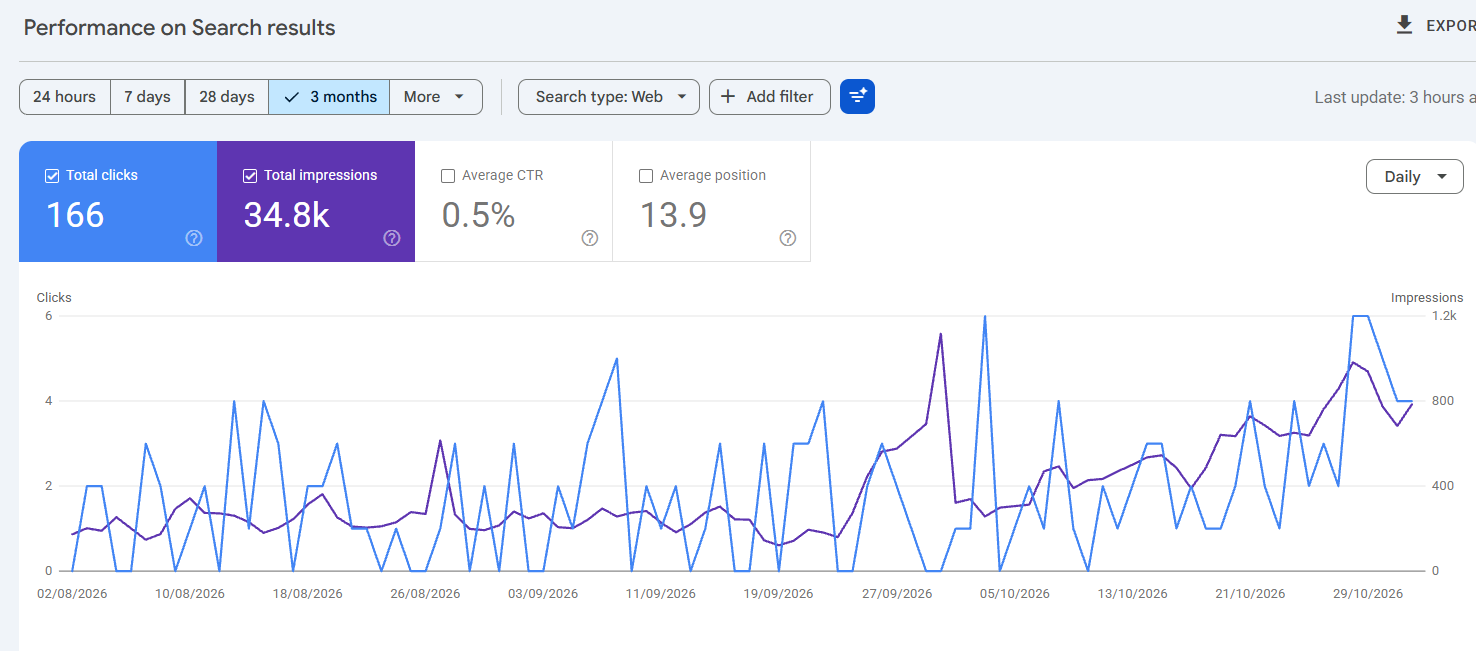
A few articles drive most of that, and the click-through rate is still low at 0.5%. Even so, the content keeps working long after the video goes out. One recording now has two ways to bring someone in: YouTube, or an article on the website.
Where the Numbers Mislead You
The DataForSEO MCP gives you numbers, not judgement. Five places still need you:
- The numbers do not know what you wrote. "facebook ads budget calculator" looked like a great pick on paper. The searcher wanted a tool, so it was the wrong pick.
- The clash check can cry wolf. "facebook ads on a budget" was flagged against an unrelated content marketing article simply because both contained "on a budget". Read the flag before you trust it.
- The intent labels can be wrong. DataForSEO tags "claude video editing" as navigational, as if people wanted one specific site. In reality they want to learn how.
- It does not know your own site. DataForSEO only knows Google. Search Console is what tells you what your website is already doing, so you need both.
- You still read the draft. It saves as a draft for a reason.
Who Should Skip This
If you do not have a website or a blog, skip this entirely. The whole method only pays off when there is somewhere for the article to live.
Three Things to Do This Week
- Take your last video and write down the keyword you used on YouTube.
- Open a DataForSEO account with the $1 trial credit, connect the MCP to Claude, and check that keyword on Google. See whether it comes back empty.
- Ask for the related phrases, bin the ones with the wrong intent, and write one article on the phrase that is left. Then leave it for a few weeks and watch Search Console.
FAQ
What is the DataForSEO MCP?
The DataForSEO MCP is a Model Context Protocol server that connects AI assistants such as Claude to DataForSEO's APIs. Once connected, you can ask for keyword volumes, difficulty, search intent and search results in plain English. It covers modules including SERP, Keyword Data, DataForSEO Labs, Backlinks, On-Page and AI Optimization, and runs remotely or locally through npx.
How much does DataForSEO cost?
DataForSEO is pay as you go with no subscription. The minimum top-up is $50, the balance never expires, and new accounts get a $1 trial credit. Keyword research calls in DataForSEO Labs cost $0.012 per task plus $0.00012 per item returned, so a single keyword check usually costs a cent or two.
How do I connect DataForSEO to Claude Code?
Create a DataForSEO account, copy your API login from the API Access dashboard, then add the server using the command on DataForSEO's help centre page for Claude Code. Enter your login yourself, never in the chat. Run claude mcp list and look for "Connected" next to dataforseo, then ask Claude to look up a few keywords as a test.
Should my blog post use the same keyword as my YouTube video?
Usually not. People search YouTube and Google with different words, so a strong YouTube keyword often has little or no Google volume. In my case, "facebook ads small budget" had 4,240 monthly searches on YouTube and about 10 on Google. Keep the video's topic, then pick a Google keyword the video actually answers.
Give Every Video a Second Job
Your video already did the hard work. The article just needs the right words so Google can find it, and the DataForSEO MCP is the cheapest way I have found to get them.
If you want to set up this whole system yourself, from the MCP connection to the WordPress drafts, it is taught step by step inside The AI Marketing Hub. Start with a 7-day free trial and build it at your own pace.
Disclosure: Some links in this article are referral links. If you use one, I may earn a commission at no extra cost to you. I only link to tools I actually use.
How this was made: The facts, numbers and examples in this article come from my own work and videos. I use AI to help draft and structure the writing, then I review and edit every line myself before it goes live.

About the author
I'm Wayne St Ledger, and I run St Ledger Marketing. I started out in construction as a plasterer, then went on to a Bachelor's in Marketing and a Master's in International Business, which is where my bias toward results over talk comes from. I help business owners build marketing systems they actually understand, using AI in grounded, practical ways rather than hype. I also run a YouTube channel on marketing and AI, and The AI Marketing Hub, my own community for business owners and marketers putting AI to work properly.