Everyone is building a real life Jarvis AI right now. Search YouTube and you'll find build after build with hundreds of thousands of views: a glowing face, a voice that answers back, a little assistant that tells you to put Instagram down. They're clever builds. However, for a business owner, a Jarvis that talks is mostly a toy.
My own AI doesn't talk to me at all. I call it Alex, and between 12 September and 12 October 2026 it helped produce 250 published posts, 30 finished reels, 12 edited YouTube videos, 68 thumbnails, 6 blog articles, 5 new lead magnet pages, 16 live DM keywords and 15 research reports. This guide covers what a real life Jarvis should actually do for a business, the seven jobs mine does, and where it still breaks.
What a Real Life Jarvis AI Should Actually Do
In the first Iron Man film (2008), J.A.R.V.I.S. is voiced by Paul Bettany. According to Wikipedia, its job is running the internal systems of Tony Stark's buildings and his suits. It gives Tony the readouts, and Tony makes the call.
Most YouTube versions copied the other half. They copied the voice, the chat and the glowing lights, and missed the work. So there are really three versions of Jarvis:
| Version | What it does | Use to a business |
|---|---|---|
| The film | Runs the buildings and the suits, gives the readouts, Tony decides | High: it runs the operation |
| YouTube builds | Talks back, glows, tells you the weather | Low: fun to build, ships nothing |
| Mine | Researches, scripts, edits, builds pages, answers comments | High: content out the door, leads coming in |
As I put it in the video: "I don't want it to talk to me. I want to give it instructions. I want to give it tasks." Every hour spent talking to an AI is an hour not spent talking to real people, whether that's customers or the people in your community.
Why a Talking Jarvis Isn't Worth It Yet
A talking assistant takes a long time to set up and a lot of messing around to get right. Then it tells you things you already know. You can look out the window to check the weather. You don't need an AI to read it out.
Most small business owners will never sit down and learn to build their own version of Tony Stark's Jarvis, and they don't need to. What they need is the boring part: the research, the editing, the pages, the follow-up.
It Advises. It Builds. I Decide.
That one line is the whole setup. The AI does the legwork and hands me something to decide on. It doesn't get complete freedom to do whatever it wants. I decide whether the work is good and whether it goes out.
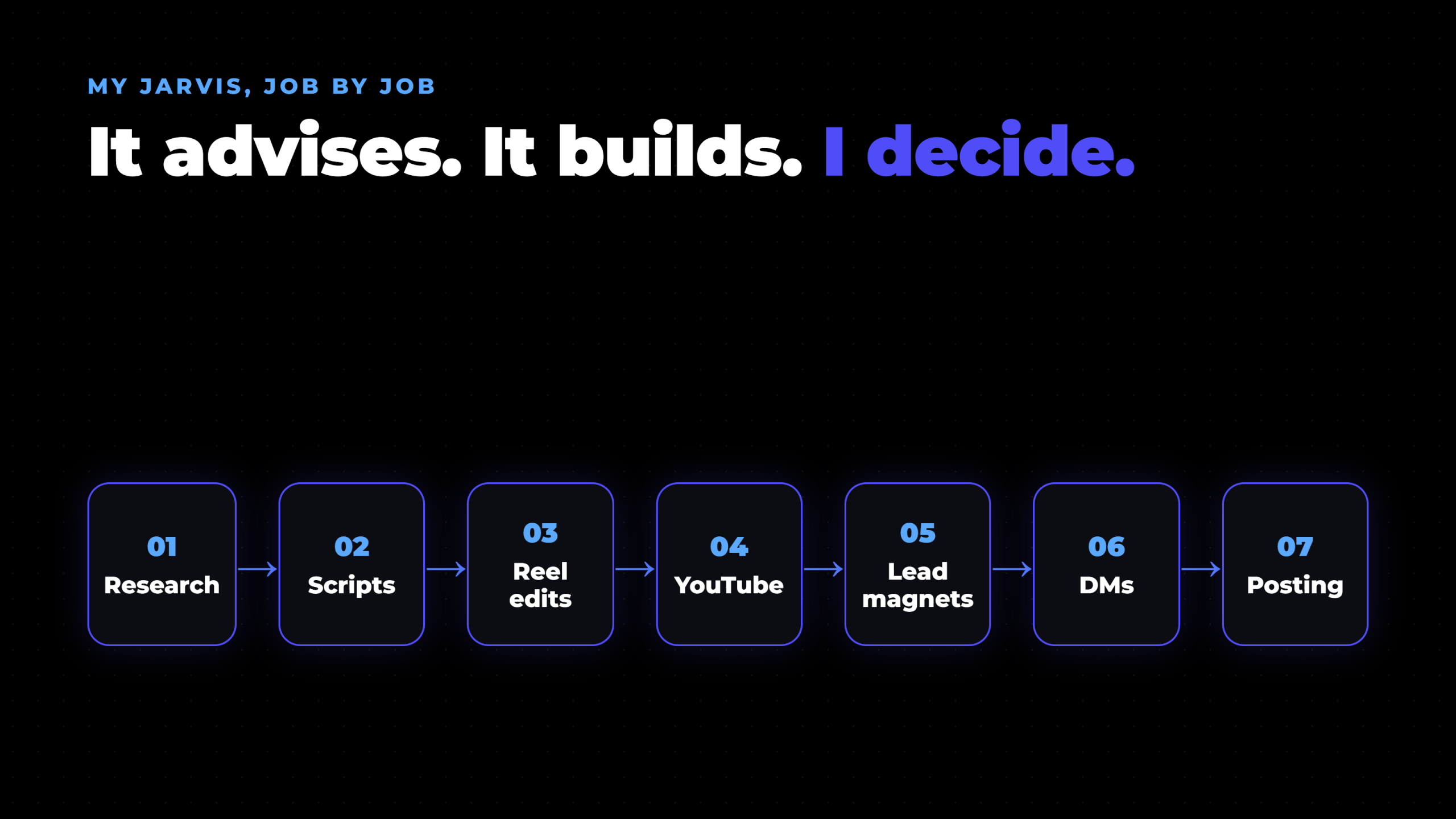
I've built this over roughly 12 months. Each block connects to the next, so research feeds the scripts, the scripts feed the recording, the recording feeds the edits, and so on down the line. The only part that genuinely needs my face is the recording.
The Seven Jobs My Jarvis Does
Job 1: Research (The Readout)
This is the Jarvis bit most people miss. Without ideas I'm lost, so the AI goes out and gathers information. What's doing well? Which videos are breaking out? What are competitors posting?
Then it hands that back to me. Whether I use it is my call, and even when I do, it can still turn out to be rubbish. What matters is that I have something real to make a decision with, instead of a blank page.
This video is the example. While I was brainstorming, the Jarvis trend popped up in the research. Everyone was building one. I wanted a different angle, so I asked a different question: is it really needed? The AI found the trend. I picked the angle. Last month that research step produced 15 reports.
Job 2: Scripts (One Sheet, Ten Reels)
Once there's an idea, the AI builds the recording script. It's not word for word. It's bullet points I glance at while I talk, plus what's coming up on screen, so I can talk about it naturally.
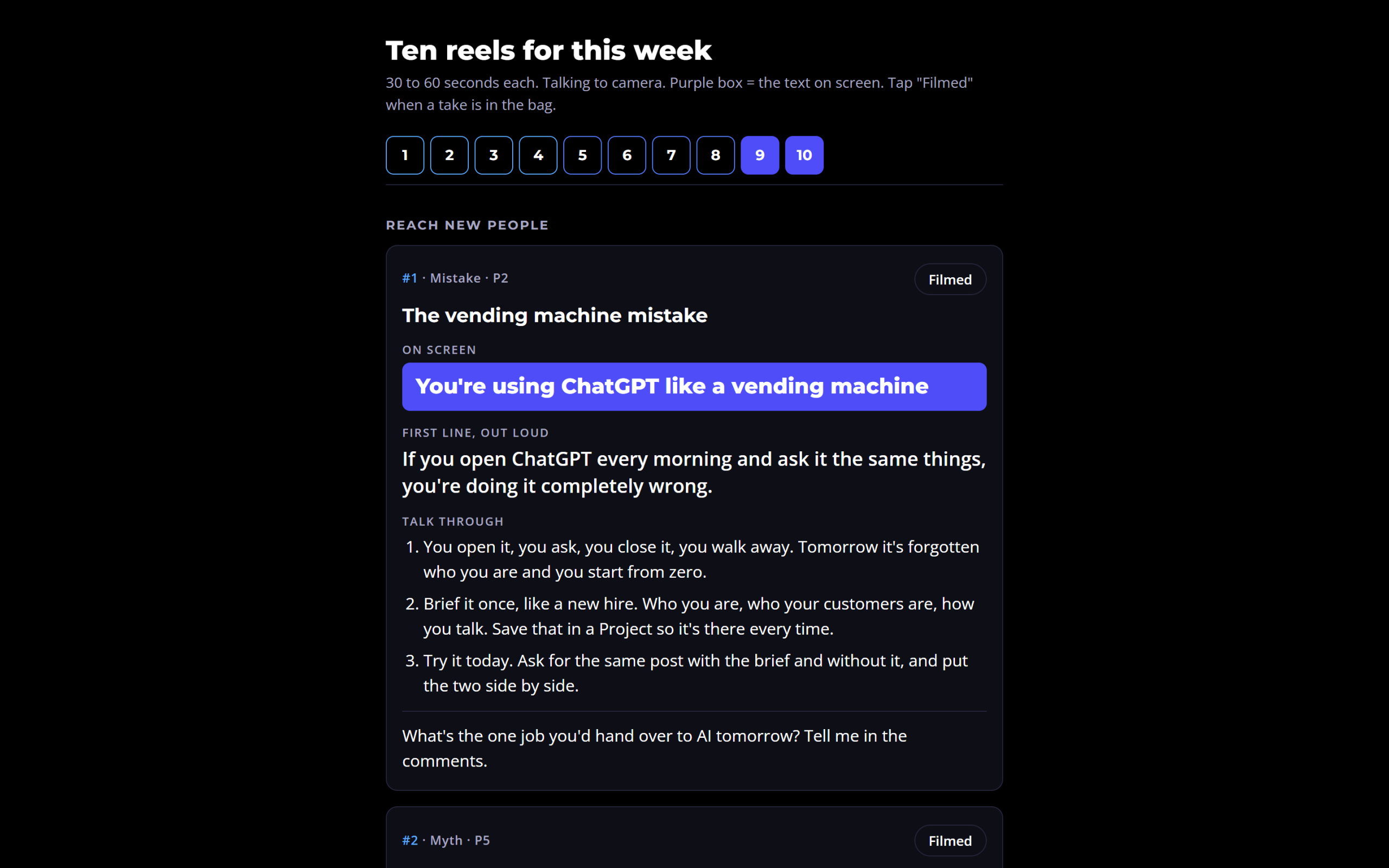
For short-form, one sheet gives me roughly 10 reels. I record them one after the other in a single sitting. Everything I need for the session is gathered into one place, which makes recording far easier.
Job 3: Edits (I Say Yes or No)
This is the big one. I don't sit down and edit any more. After a recording session I hand the footage over and tell it to edit the video, and to make it look better than I could myself.
It cuts the dead air and retakes, adds captions and motion graphics, and brings in the logos of any tool I mention. If I say Claude, the Claude logo appears. Then I watch it and say yes or no, with the odd small change. Last month that came to 30 finished reels and 12 edited YouTube videos.
Job 4: YouTube (From One Recording)
For long-form, the work starts before I film. The filming sheet has the keywords built in, so I know which words to say in the video. After recording, the same system generates thumbnails, captions and the description, and drafts the matching blog article. In the last month: 68 thumbnails and 6 articles.
Job 5: Lead Magnets (Pages, Not Canva)
This is one of my favourite builds of the last six or seven months. Building a lead magnet used to mean opening Canva, bringing in a load of images, putting everything together, and spending two or three days on something I didn't even like.
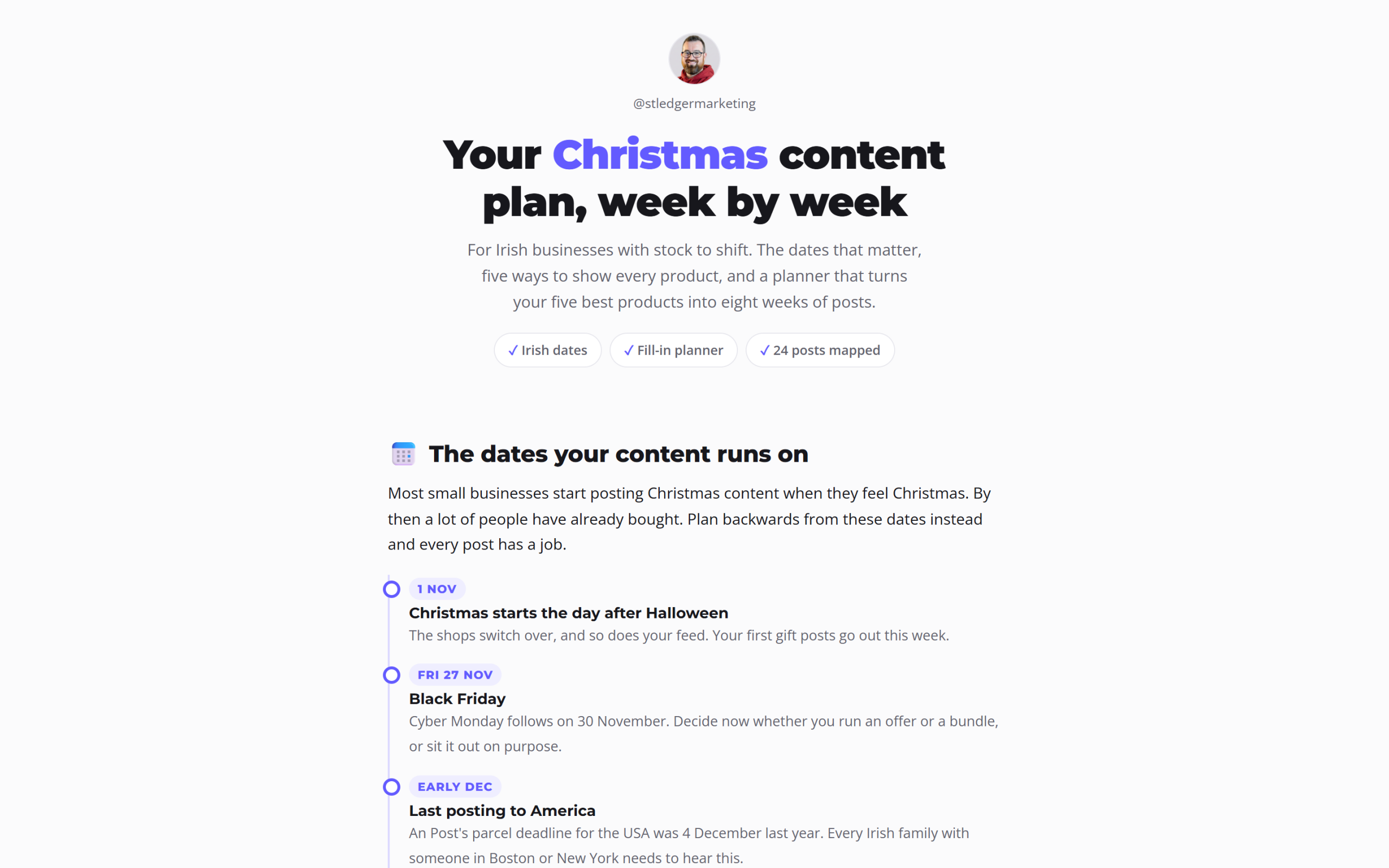
Now AI builds the page. On the morning I filmed this video, I asked it for a lead magnet on the important dates for Irish businesses at Christmas. It built the page, created the DM automation that goes with it, and gave me three or four reel ideas to promote it, all while I was doing something else. Every page also goes into a library that community members can browse. Five new pages went live last month.
Job 6: DM Automations (Comment a Word, Get the Page)
You've seen it on Instagram and Facebook: comment a word, get a free gift. For the Christmas plan, the keyword is ROBIN. Someone comments ROBIN, and the DM is sent straight away with the page.
This matters because the old way doesn't work. Nobody stops watching a reel, goes to your profile and clicks the link in your bio. However, people will type one word. It's much easier to move someone from Instagram onto an email list when you provide the step in the middle. You're also in their DMs, so you can follow up once later without bombarding them. I run this through Blotato, and 16 keywords are live right now.
Job 7: Posting (The Part Everyone Sees)
Posting is the last job, not the whole job. Everything above goes into a queue and goes out to every platform it belongs on. Between 12 September and 12 October 2026 that came to 250 posts across six platforms: LinkedIn 53, Facebook 51, Instagram 50, TikTok 41, X 39 and YouTube 16.
At around 10 to 15 minutes per post to upload, pick a day and time, write the caption and hit schedule, 250 posts by hand would be 42 to 63 hours of work.
What My Jarvis Produced in 30 Days
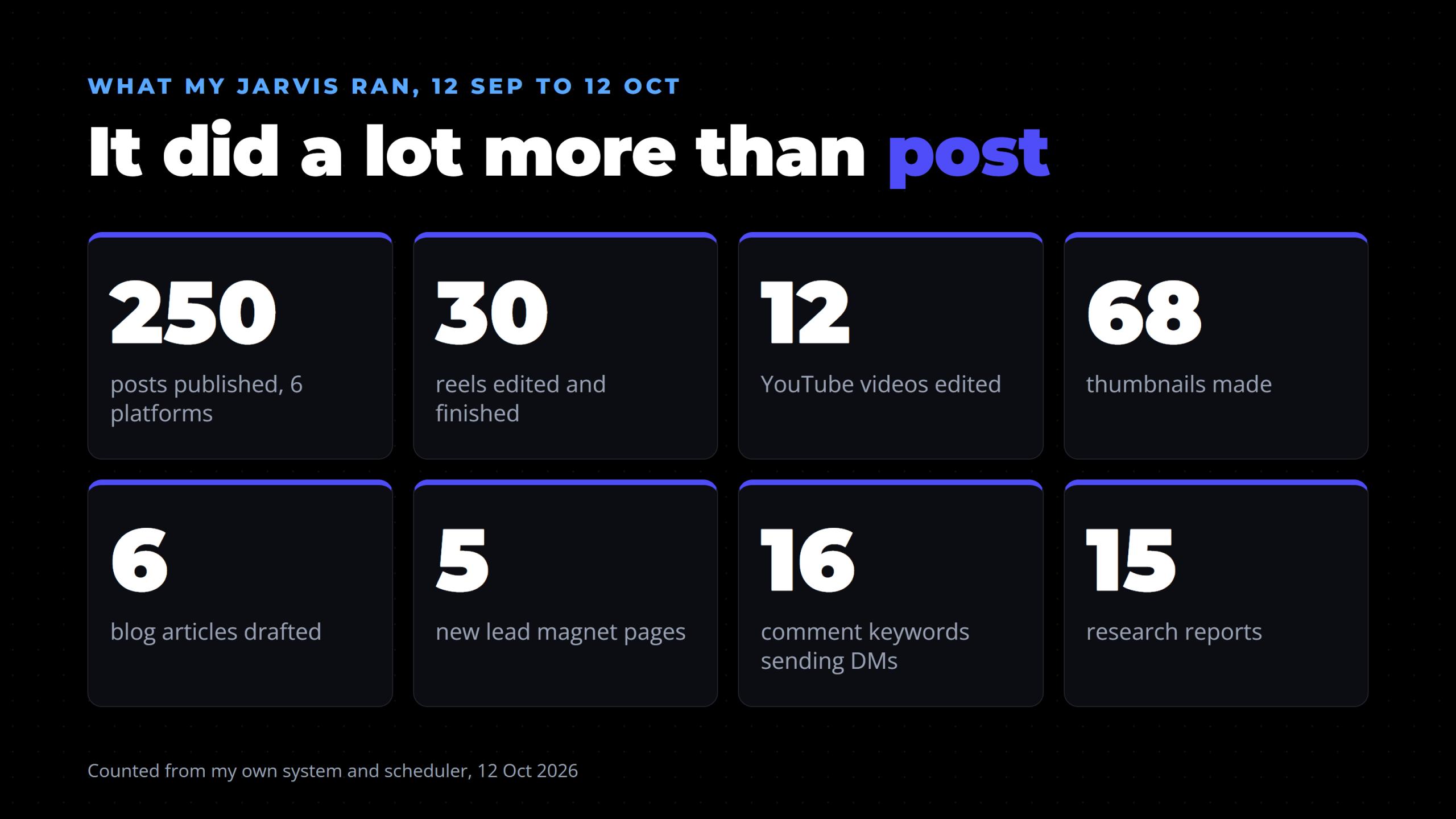
| Output | Count, 12 Sep to 12 Oct 2026 |
|---|---|
| Posts published (6 platforms) | 250 |
| Reels edited and finished | 30 |
| YouTube videos edited | 12 |
| Thumbnails made | 68 |
| Blog articles drafted | 6 |
| New lead magnet pages | 5 |
| Comment keywords sending DMs | 16 |
| Research reports | 15 |
Output Is Not Results
Be honest about what those numbers are. 250 posts is output. It isn't a result on its own unless it's driving something. Posting more doesn't automatically mean more views. What volume does give you is pattern spotting. For me, posting more on YouTube made my long-form videos do worse, so I cut back there. Posting more on TikTok made no difference, so I kept going.
Where It Breaks
None of this runs itself. A few honest weak spots:
- I'm still the main person. I have to say do X, do Y. If I forget, nothing happens. Reminders help, but the system waits for me.
- You still have to watch the output. One full video edit this month was rendered, watched and rejected because the voice sounded echoey, and it had to be re-recorded. The AI did the edit. I still had to check it.
- Volume isn't selling. Posts get you seen. They don't do the selling for you.
Who Shouldn't Build This Yet
- If you don't yet know what you sell or who it's for, 250 posts a month spreads that confusion faster. Fix the offer first.
- If you won't check what goes out, don't automate it. Every piece still needs your eyes.
So, Do You Need a Real Life Jarvis AI?
My verdict: you don't need a Jarvis until you have a system underneath it. Once that system is running, a Jarvis that reminds you where things are up to might earn its place. For example: here's the DM automation built for this week's keyword, here are your 10 reels to record, and once those are done we move on.
That makes sense. Building a system to tell you what to do, before you know what you're doing yourself, does not. Many of the Jarvis builds online are built around their makers' own needs. Build yours around yours, and only once you find you're the bottleneck.
Three Things to Do This Week
- Pick the one job that eats most of your week. For most business owners that's editing or posting.
- Give AI that job, not a personality. Instructions and tasks, not conversation.
- Keep the decision. Let it advise and build. You approve what goes out.
FAQ
Can you build a real life Jarvis AI?
Yes. Plenty of people have built talking assistants with voice, memory and even camera vision using tools like Claude. The harder question is whether you need one. For a business, the useful part of Jarvis is the work it does in the background, such as research, editing and follow-up, rather than the conversation.
What is a Claude Jarvis?
"Claude Jarvis" is the name people give to a personal assistant built on Anthropic's Claude, usually styled on the AI from Iron Man. Most versions focus on talking back and answering questions. My version is called Alex, and it works on tasks instead: research, scripts, edits, lead magnet pages and DM automations.
What can an AI assistant do for a small business?
In my business it handles research, filming scripts, reel and YouTube edits, thumbnails, blog drafts, lead magnet pages and comment keyword DM automations, with Blotato handling the posting. Over 30 days that came to 250 published posts across six platforms. I still record the videos and approve everything that goes out.
Is it worth building your own AI Jarvis?
Not until you have a working system underneath it. A Jarvis that talks takes a long time to build and doesn't produce content or leads by itself. Get the jobs running first. Then, if you find you're forgetting steps, a Jarvis that reminds you what's next can be worth building.
Build the Boring Version First
The best real life Jarvis AI for a business isn't the one that talks. It's the one that researches, builds and hands you decisions. Start with one job, keep the final say, and add the next job once the first one runs.
The full setup, from filming sheets to lead magnet pages and DM keywords, is taught step by step inside The AI Marketing Hub. Start with a 7-day free trial and build it at your own pace.
Disclosure: Some links in this article are referral links. If you use one, I may earn a commission at no extra cost to you. I only link to tools I actually use.
How this was made: The facts, numbers and examples in this article come from my own work and videos. I use AI to help draft and structure the writing, then I review and edit every line myself before it goes live.

About the author
I'm Wayne St Ledger, and I run St Ledger Marketing. I started out in construction as a plasterer, then went on to a Bachelor's in Marketing and a Master's in International Business, which is where my bias toward results over talk comes from. I help business owners build marketing systems they actually understand, using AI in grounded, practical ways rather than hype. I also run a YouTube channel on marketing and AI, and The AI Marketing Hub, my own community for business owners and marketers putting AI to work properly.