If you are looking for a Remotion alternative, you probably already know what Remotion does. It turns code into video. You describe the animation you want, an AI writes the code, and the tool renders it. I used Remotion for the graphics in my videos for a good while. Now I use HyperFrames for all of it.
The reason I moved has nothing to do with what you see on screen. When I gave both tools the same instructions, the finished animations were close to a tie. What changed my mind was the day-to-day work of fixing an edit before it renders. Below is the test I ran, the two reasons I switched, and the places where Remotion is still the better pick.
What Remotion and HyperFrames actually do
Both tools do the same basic job. They turn code into animation that sits on a timeline, so you can drop it into a video edit.
The big benefit is simple. You no longer sit in front of your editing software wishing you could add a little animation and having no way to make it. I do not write the code myself. I explain what I want to Claude and it writes it. A bar chart coming up on screen, a shop window effect, a flow chart. Ask for it and both tools will give it to you.
They come from different places, though:
- Remotion has been around since 2020. It is built on React, the JavaScript library most web apps are made with.
- HyperFrames is newer. HeyGen, the AI avatar company, released it as open source in March 2026. It is built on plain HTML, CSS and JavaScript, the same things a normal web page is made from, and its own GitHub page sums it up as "Write HTML. Render video. Built for agents."
The test: one animation, built in both
To see whether there is a real difference or just a personal preference, I gave both tools one spec, word for word.
The animation shows a customer journey from my own social media. Someone sees a post on Instagram and comments a word. An automation sends them a link to a guide in their DMs. They open the guide, leave their email, and from there they either join the community or get follow-up emails.
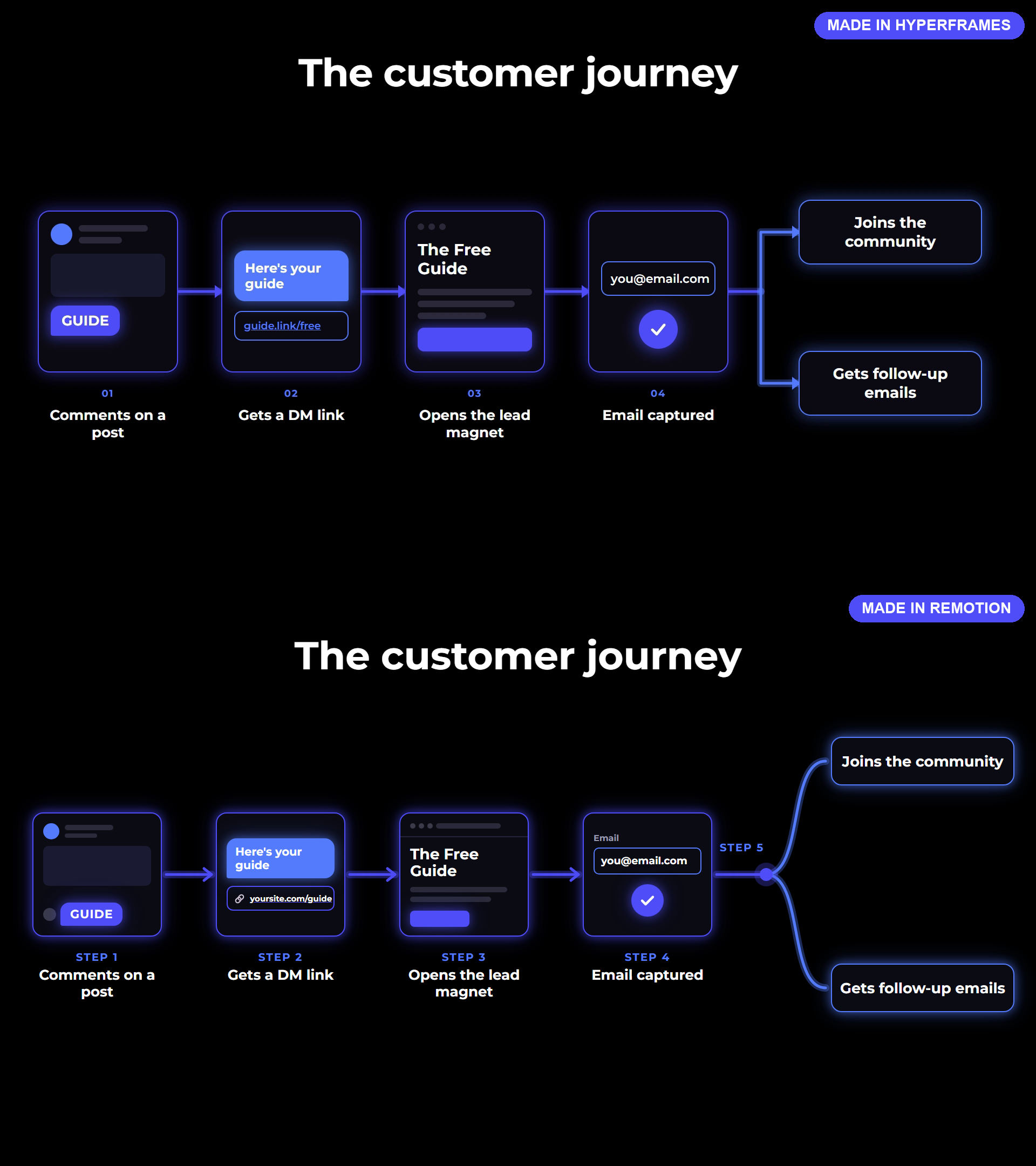
Here is how it went:
| HyperFrames | Remotion | |
|---|---|---|
| Time to build | About 4 minutes | About 2 minutes |
| Rounds of fixes needed | 0 | 1 |
| The ending | Needs a bit of refining | Cleaner split into two paths |
Remotion was quicker to build. I also like how it finishes the journey, where the path splits into two at the end. It is a lot cleaner, and I will have to refine the HyperFrames version to match it.
But a couple of minutes either way is nothing to write home about. Build time will swing a lot depending on what you are making. On raw output, both tools give you what you asked for. So if the output is close to a tie, the choice comes down to what it is like to work in each one.
Reason 1: the Studio preview
This is the biggest reason I moved, and honestly, it is probably the only deciding factor.
HyperFrames opens a preview Studio in your browser on your own machine. The video, the timeline and the settings for each element all sit in one place. It feels much closer to tools like CapCut. You can see exactly what has been edited and what has been created before you render anything.
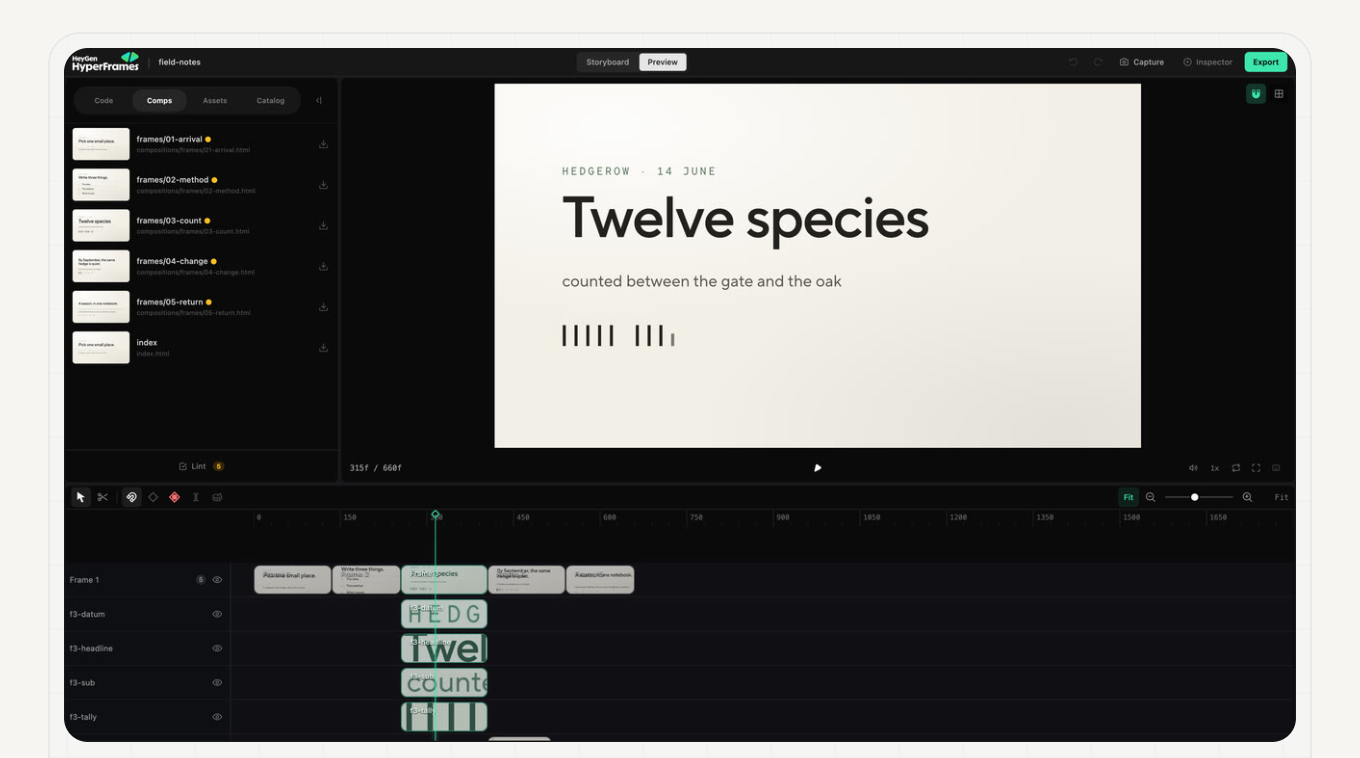
That matters because rendering can take a while if your computer is not fast. A good preview means you catch the mistakes first. In the Studio I can see what needs to change, type my changes in, and adjust small things myself. That sense of control, and how quickly it loads up, was huge for me.
I found Remotion clunky by comparison, in how it loads and in making adjustments. Sometimes a few previews would start up and run at the same time. That might not be Remotion's fault. It could be down to my own instructions to Claude. Either way, I had more problems with it than I did with HyperFrames.
To be fair, both preview tools load quickly. The difference for me is how you work inside the preview window, not raw speed. That is my experience on my own machine, not a benchmark. I could not find an independent speed test of either Studio.
Reason 2: plain HTML that AI finds easier to write
This one is a bit more technical.
HyperFrames is built like a web page. That makes it easier for an AI agent to read, build and fix, because web pages are what these models have seen most. It also renders the same frames every single time, as long as you follow its rules. HeyGen's own documentation is honest that it "breaks quietly" if you break them, so that is the trade-off.
Remotion works on React, which I find a bit clunkier day to day. In the hands of a professional motion designer, the kind of person who lives in After Effects, I think you could make some amazing designs with Remotion. For me, using it every week for my own videos, HyperFrames led the way.
I already know HTML, CSS and JavaScript from building websites. Being able to read what the AI wrote makes life much easier.
One thing to know: both can use a lot of AI tokens. Most AI editing setups do. And both now come with their own official skills for coding agents like Claude Code, so neither one has that to itself.
Where Remotion still wins, and what is free
I am not saying it is all doom and gloom for Remotion. It has been around for longer, since 2020, so there is far more written about it, more examples, and a mature cloud rendering service called Remotion Lambda.
Both are free to start, but the licences are not the same:
- HyperFrames is open source under the Apache 2.0 licence. You can use it for free, including commercially.
- Remotion is free for individuals, non-profits and companies of up to 3 people. Once your company has 4 or more people, or you are collaborating with others, you need a paid company licence.
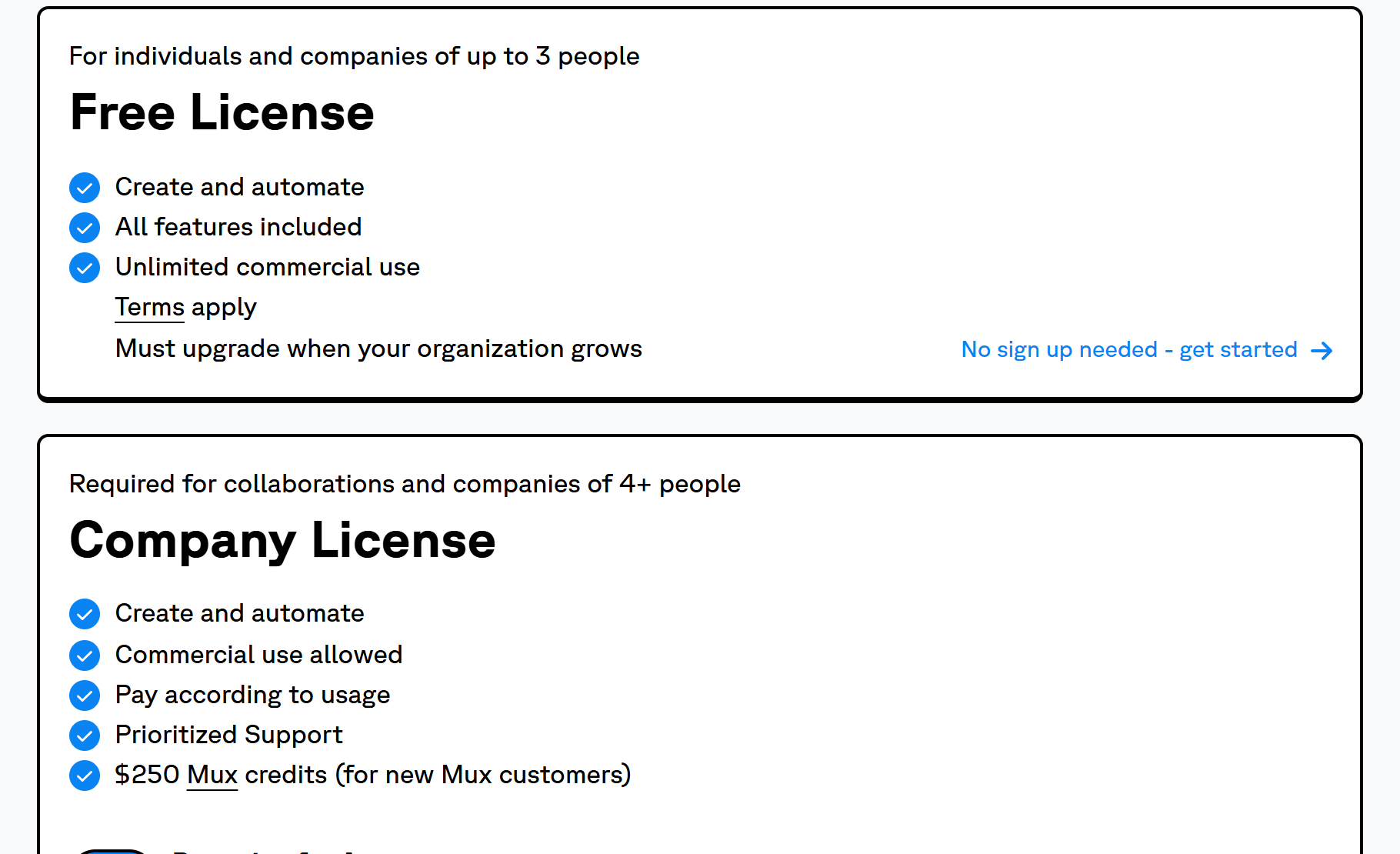
According to the Remotion licence page, the paid options are a Creators plan at $25 a month per seat, an Automators plan at $0.01 per render with a $100 monthly minimum, and Enterprise from $500 a month. If you are a one-person business, that probably does not affect you. If you have a team, check it before you build on it.
Which one should you use?
There is no right or wrong answer. Use whichever one fits the way you work.
I have used both, and I lean towards HyperFrames because of the Studio and how easy it is to adjust things myself. For you it could be Remotion. In a month it could be Remotion for me too. AI tools are moving so fast that you can jump from one to the next in a matter of minutes, so do not marry either of them.
Both work really well with Claude. If you want to pick one this week:
- Pick one small animation you actually need, like a bar chart or a simple flow chart for your next video.
- Give the exact same instructions to both tools and see which output you prefer.
- Spend ten minutes fixing something in each preview. Whichever one you would rather do that in every week is your answer.
If you want help setting up AI for your own content and marketing, I walk through it inside The AI Marketing Hub, which comes with a 7-day free trial.
Frequently asked questions
What is the best Remotion alternative?
For me it is HyperFrames, an open-source tool from HeyGen that turns HTML, CSS and JavaScript into video. It does the same job as Remotion, turning code that an AI writes into animation, but it is built on plain web pages instead of React and comes with a browser Studio for previewing and adjusting your edit before it renders.
Is Remotion free?
Remotion is free for individuals, non-profits and companies of up to 3 people. Companies of 4 or more people, and collaborations, need a paid company licence. According to Remotion's licence page, that starts at $25 a month per seat on the Creators plan. HyperFrames is open source under Apache 2.0 and free to use.
Is HyperFrames better than Remotion?
Not on output alone. When I gave both the same instructions, the finished animations were close to a tie and Remotion was quicker to build. I prefer HyperFrames because its Studio preview lets me see and adjust the edit before rendering, and plain HTML is easier for me and for AI to work with.
Can Claude write Remotion and HyperFrames videos?
Yes. I do not write the code for my animations myself. I explain what I want to Claude and it writes the code for either tool. Both Remotion and HyperFrames now provide official skills for coding agents like Claude Code, which makes the results more reliable.
Disclosure: Some links in this article are referral links. If you use one, I may earn a commission at no extra cost to you. I only link to tools I actually use.
How this was made: The facts, numbers and examples in this article come from my own work and videos. I use AI to help draft and structure the writing, then I review and edit every line myself before it goes live.

About the author
I'm Wayne St Ledger, and I run St Ledger Marketing. I started out in construction as a plasterer, then went on to a Bachelor's in Marketing and a Master's in International Business, which is where my bias toward results over talk comes from. I help business owners build marketing systems they actually understand, using AI in grounded, practical ways rather than hype. I also run a YouTube channel on marketing and AI, and The AI Marketing Hub, my own community for business owners and marketers putting AI to work properly.