
How to Run a Free Instagram Audit Using AI Tools (2026 Guide)
Why Most Business Owners Are Overpaying for Instagram Audits
A professional Instagram audit costs between €500 and €2,000, according to WebFX’s 2026 social media pricing data. For a small business owner, that’s money that could go toward stock, staff, or actual advertising. Here’s the thing: you can now run a comprehensive AI Instagram audit yourself using free tools and get roughly 80% of what that professional would deliver.
Instagram has 3 billion monthly active users as of September 2025 (CNBC). That’s half of all internet users on one platform. If your business is on Instagram and you haven’t audited your account in the last six months, you’re operating blind. The algorithm has changed, hashtags have lost their grip, and keyword-based search now drives organic discovery.
This guide walks you through the exact workflow for auditing your Instagram account using AI tools you already have access to. No subscriptions, no agency fees, no fluff.

How Instagram Discovery Works in 2026
Instagram is no longer a hashtag-driven platform. It’s a search engine.
Instagram head Adam Mosseri confirmed that hashtags won’t necessarily increase content visibility. The platform removed the ability to follow hashtags entirely, shifting the discovery model toward keyword-based indexing. According to Dive Media’s 2026 analysis, keyword-rich captions now generate approximately 30% more reach and twice as many likes compared to hashtag-heavy posts.
What does this mean for your audit? Three things matter more than they used to:
– Your name field. Instagram indexes your name field separately from your handle. If your name field says “John” instead of “John | Wexford Coffee Roaster,” you’re invisible to local search.
– Your caption text. Instagram indexes the actual words in your captions, on-screen text, and spoken audio in Reels.
– Your thematic consistency. The algorithm evaluates your last 9–12 posts to categorise your account into a content “neighbourhood.” If you post about coffee on Monday and crypto on Wednesday, the algorithm doesn’t know where to put you.
These are exactly the things an AI audit catches and the things most business owners miss.

The AI Instagram Audit Toolkit
You need four tools. All of them are free or have free tiers.
Google NotebookLM
NotebookLM is Google’s AI research assistant. You feed it sources, articles, PDFs, and web pages, and it generates structured briefing documents, summaries, and presentations from them.
For this workflow, you use NotebookLM to create a research briefing on Instagram strategy in 2026. Upload the latest articles on Instagram’s algorithm, SEO changes, and engagement data. NotebookLM synthesises them into a single reference document that becomes the benchmark for your audit.
Pro tip: Upload 5–8 recent articles from sources like Hootsuite, Sprout Social, and Socialinsider. NotebookLM handles up to 300 source documents, but quality matters more than quantity here. Three solid industry reports beat twenty blog posts.
Google Gemini
Gemini is the workhorse. It’s a multimodal AI, meaning it can process text, images, and video simultaneously. You upload your NotebookLM briefing document (as a PDF), your downloaded Instagram Reels, and a screen recording of your profile. Gemini analyses everything together and produces a structured audit.
What Gemini evaluates:
– Bio and name field optimisation
– Content style and consistency
– Engagement patterns across your uploaded Reels
– Profile navigation (highlights, grid layout, CTA placement)
– Alignment with current Instagram best practices (from your briefing document)
In our experience, Gemini’s audit output covers roughly the same ground as a mid-tier professional audit bio review, content analysis, engagement assessment, and prioritised recommendations.
SortFeed
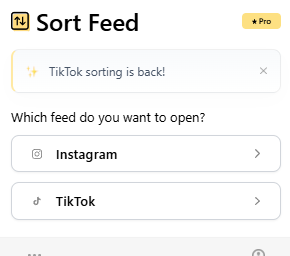
SortFeed is a Chrome extension that sorts your Instagram feed by performance metrics. It scans your last 200 posts and sorts them by likes, comments, or views.
This matters because most business owners don’t know which of their posts actually performed well. They scroll through their grid and guess. SortFeed removes the guesswork you see exactly which content types drive engagement and which ones fall flat.
ManyChat
ManyChat is a DM automation tool. When someone comments a specific keyword on your post, ManyChat automatically sends them a direct message with whatever you’ve set up: a link, a lead magnet, or a welcome sequence.
This isn’t part of the audit itself, but it’s what you implement after the audit. Once you know which content types drive the most comments, you pair them with ManyChat triggers to convert that engagement into leads.
The Complete AI Instagram Audit Workflow
Here’s the step-by-step process. Budget about 90 minutes for your first run.
Step 1: Build Your Research Briefing (20 minutes)
1. Open Google NotebookLM
2. Upload 5–8 recent articles on Instagram strategy, algorithm changes, and engagement benchmarks from trusted sources (Hootsuite, Sprout Social, Socialinsider, Later)
3. Ask NotebookLM to generate a “Comprehensive Briefing Document on Instagram Strategy for 2026”
4. Download the output as a PDF this becomes your audit benchmark
Step 2: Download Your Content (10 minutes)
1. Download your 10 most recent Instagram Reels (you can screen-record them or use Instagram’s download feature)
2. Include a mix your best performers and your worst
3. Also grab 2–3 static posts or carousels if they’re a significant part of your content
Step 3: Record Your Profile (5 minutes)
1. Open your Instagram profile on desktop
2. Use Windows Print Screen or any screen recording tool
3. Record a 30-second walkthrough: bio, highlights, grid, a few post interactions (hover over posts to show like/comment counts)
4. Save the recording
Step 4: Upload Everything to Gemini (10 minutes)
1. Open Google Gemini
2. Upload the NotebookLM PDF briefing first and tell Gemini: “This is the reference document for evaluating Instagram accounts in 2026. Confirm you understand it before we continue.”
3. Wait for confirmation
4. Upload your Reels in a batch (Gemini allows up to 10 attachments per message)
5. Upload the screen recording of your profile
6. Prompt Gemini: “Based on the reference document, audit this Instagram account. Cover: bio optimisation, content strategy, engagement patterns, profile navigation, and provide a grading scale of 1–10.”
Step 5: Analyse Content Performance (15 minutes)
1. Install the SocialFeed Chrome extension
2. Navigate to your Instagram profile on desktop
3. Set SocialFeed to scan your last 200 items
4. Sort by likes first note your top 5 posts and their content types
5. Sort by comments note any topics that sparked discussion
6. Sort by views identify which Reels format gets the most eyeballs
Step 6: Compile and Act (30 minutes)
1. Read Gemini’s audit output it will flag specific issues and recommendations
2. Cross-reference with your SortFeed data d,oes Gemini’s content strategy advice align with what’s actually performing?
3. Make a priority list: name field fix, bio update, content focus shift, posting consistency
4. Implement the quick wins immediately (name field and bio take 2 minutes)
5. Plan your next two weeks of content based on the content types that your data says actually work
Pro tip: Don’t try to fix everything at once. Start with the name field and bio; those are the highest-leverage, lowest-effort changes. Then shift your content mix over the following week. Small adjustments compound faster than a complete overhaul.
What the Audit Output Actually Looks Like
Gemini produces structured feedback. In a recent test, the output included:
– A grading score of 8/10 with specific reasoning for each point gained and lost
– Name field diagnosis: Identified that the name field lacked targeted keywords and recommended specific alternatives
– Content style assessment: Noted that the account had “successfully abandoned corporate polish” aligning with Instagram’s 2026 preference for authentic, raw content
– Hashtag strategy review: Flagged that hashtags were absent from captions but concluded this was actually correct, since Instagram’s discovery model has shifted to keyword-based SEO
– Engagement optimisation: Highlighted the use of fast-paced text overlays and comment-triggered DM automation as strong engagement tactics
– Profile navigation audit: Reviewed highlights, grid consistency, and CTA placement
The output is detailed enough to act on immediately. It’s not a vague “your account could be better” it’s specific, prioritised, and backed by the research briefing you provided.
When you look at your SocialFeed data alongside Gemini’s recommendations, patterns emerge. Testimonials and behind-the-scenes content tend to outperform polished productions. Memes and free offers drive likes. Comment-provoking questions drive DM automation opportunities.
To see how a New Ross café could apply this exact process and fix their Instagram in one afternoon, read our article on how a New Ross café applied this audit process.
Why This Works Better Than You’d Expect
The average Instagram engagement rate for business accounts sits at 0.45% according to Socialinsider’s 2025 benchmarks. Carousels outperform everything else, achieving an average 1.92% engagement rate compared to 0.50% for Reels and 0.45% for static images (Socialinsider, 2025). Mixed-media carousels combining images and video push even higher, averaging 2.33% engagement.
Most business owners don’t know these numbers. They post what feels right and hope for the best. An AI audit surfaces these patterns in your own account data, so you can shift your content mix based on evidence rather than instinct.
What I’ve found working with SMEs is that the biggest wins usually aren’t creative they’re structural. A keyword-optimised name field, consistent posting themes, and a bio with a clear call to action will outperform any amount of cinematic content production.
The data backs this up. Accounts that maintain thematic consistency across their last 9–12 posts get categorised faster by the algorithm, which means the platform knows who to show your content to. Accounts that jump between unrelated topics force the algorithm to start over every time and in a feed with 3 billion monthly users competing for attention, you can’t afford to be uncategorised.
With only 12% of Irish SMEs currently using AI in their operations (according to our what Irish businesses need to know about AI), there’s a real first-mover advantage here. The businesses that start using AI for self-auditing and content strategy now are building a data advantage that compounds over time.
If you’re already thinking about how AI fits into your broader content process, our guide on how to build your first AI content workflow walks through the next logical step.
Frequently Asked Questions
Do I need technical skills to run an AI Instagram audit?
No. If you can upload files and type a prompt, you can do this. NotebookLM and Gemini are browser-based tools with no installation required. SocialFeed is a standard Chrome extension. The entire workflow uses drag-and-drop uploads and plain English prompts.
How accurate is an AI audit compared to a professional one?
Based on testing, Gemini’s audit captures approximately 80% of what a professional audit covers bio optimisation, content strategy, engagement analysis, and profile navigation. Where it falls short is in nuanced competitive analysis and platform-specific trend forecasting. For most small businesses, 80% is more than enough to identify and fix the structural issues that are limiting growth.
How often should I audit my Instagram account?
Run a full audit quarterly. Between audits, use SocialFeed monthly to check which content types are performing. Instagram’s algorithm evolves constantly the accounts that check and adjust regularly outperform those that set and forget.
Is Google Gemini actually free for this?
Yes. The free tier of Google Gemini supports file uploads, including PDFs and video. You’re limited to 10 attachments per message, which is enough for a comprehensive audit. If you have a large volume of Reels, batch them across two messages.
Start Auditing Smarter
You don’t need to spend €1,800 to understand what’s working on your Instagram account. The tools are free, the workflow takes 90 minutes, and the output is specific enough to act on the same day.
The gap between businesses that use AI and those that don’t is widening. Every month you spend posting without data is a month of wasted effort. Run the audit, fix the structural issues, and let your content actually reach the people it’s meant for.
Want step-by-step breakdowns like this delivered regularly? Join our membership for ongoing support exclusive guides, templates, and the kind of practical AI marketing knowledge that actually moves the needle.