
Batching content is the only reason I post every day without a team. Once a week I sit down and record about 10 short reels in one go. Then AI edits them, turns each one into several other formats, and schedules the lot across six platforms. Over the 14 days from 25 September to 8 October 2026, that routine put out 137 posts.
This guide covers what batching content means, the five stages I run every week, and the tools behind each one. It also covers where the system still breaks. You will finish with a plan you can run this week, with or without AI.
What Is Batching Content?
Batching content means making a week of posts in one focused session. You stop creating something new every single day. You do all the ideas together, all the recording together, all the editing together and all the scheduling together. Because each job runs in one block, you stop paying the start-up cost of switching tasks five times a day.
The idea is simple. However, most people who try it give up, and the reason matters.
Why Posting by Hand Falls Over
Posting does not fall over because you have nothing to say. Instead, it falls over because every single post is six jobs:
- Come up with the idea
- Film it
- Edit it
- Write the caption
- Resize it for every platform
- Upload it, six separate times
Then you do it all again tomorrow. That is why so many businesses post for a few weeks, disappear, then come back and repeat the cycle.
The research backs up how common this is. The Content Marketing Institute found that lack of resources was the most cited challenge outside content creation itself, named by 54% of B2B marketers. In the same survey, 42% said creating content consistently was a top challenge. Only one in three had a scalable model for content creation.
Interruptions make it worse. Microsoft's Work Trend Index telemetry shows that employees using Microsoft 365 are interrupted every 2 minutes by a meeting, email or notification. Squeezing a post into that kind of day, every day, is exactly how the habit dies.
The Five Stages of My Content Creation Workflow
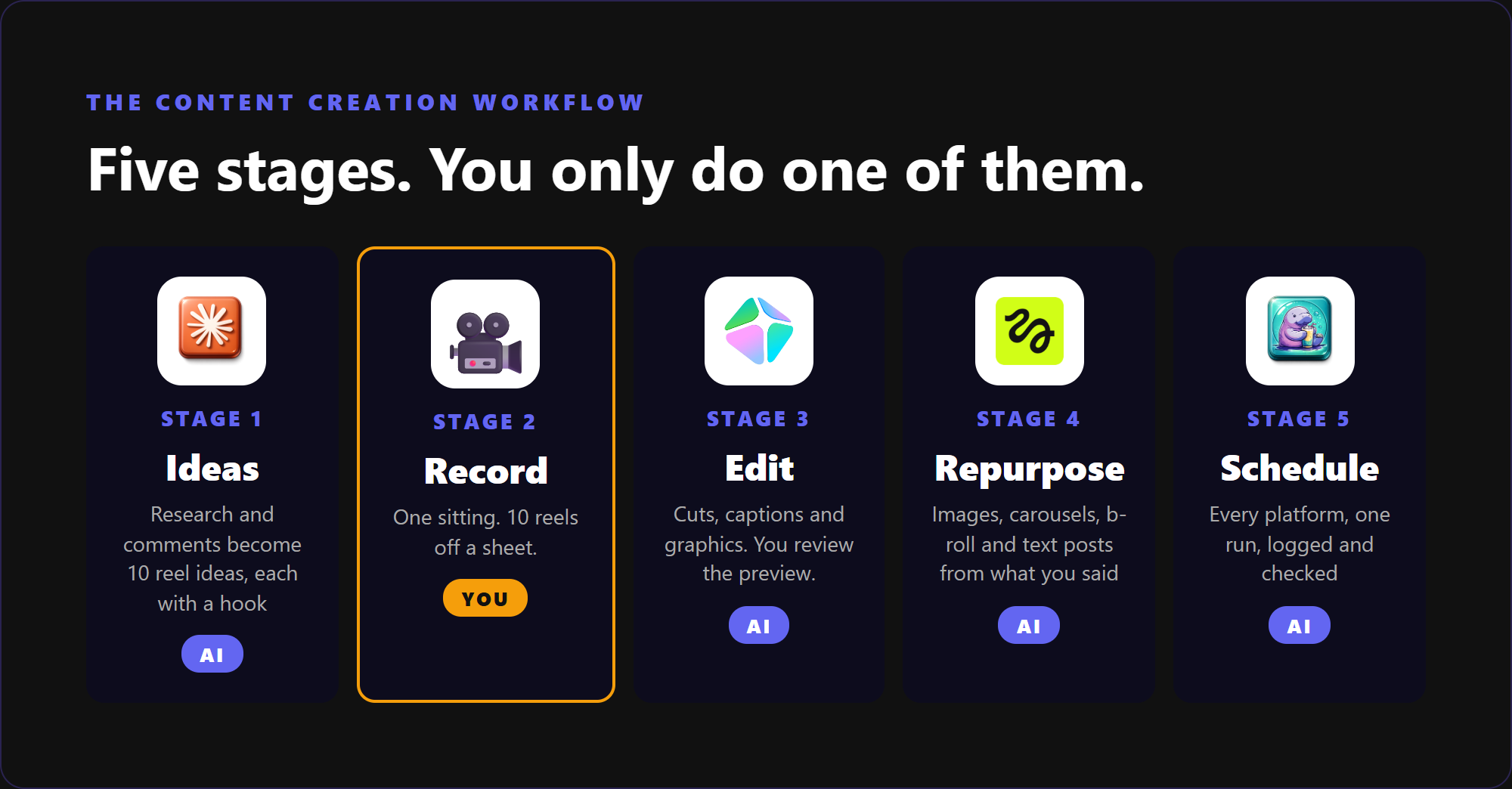
My content creation workflow has five stages: Ideas, Record, Edit, Repurpose and Schedule. I only do one of them myself, the recording. AI handles the other four, and I review what it produces before anything goes out.
Batching on its own saves time, but you still edit, caption and upload everything by hand. Batching with AI removes the parts that used to eat the evenings. The one session you protect each week becomes the session only you can do.
Stage 1: Ideas (Never Start From a Blank Page)
By the time I sit down to record, the thinking is already done. I use Claude Code, Anthropic's AI assistant that runs on my own computer and works through my files. Over the course of the week it gathers ideas from three places:
- Competitors and creators I follow. A weekly sweep looks at the last seven days of posts from accounts I follow. Anything that has done unusually well gets flagged, because people have already shown they want that topic.
- What is trending in my space. AI pulls it all into one place I can review in a few minutes.
- Questions from customers. Comments and DMs are the best idea source there is, because they are real questions from real people.
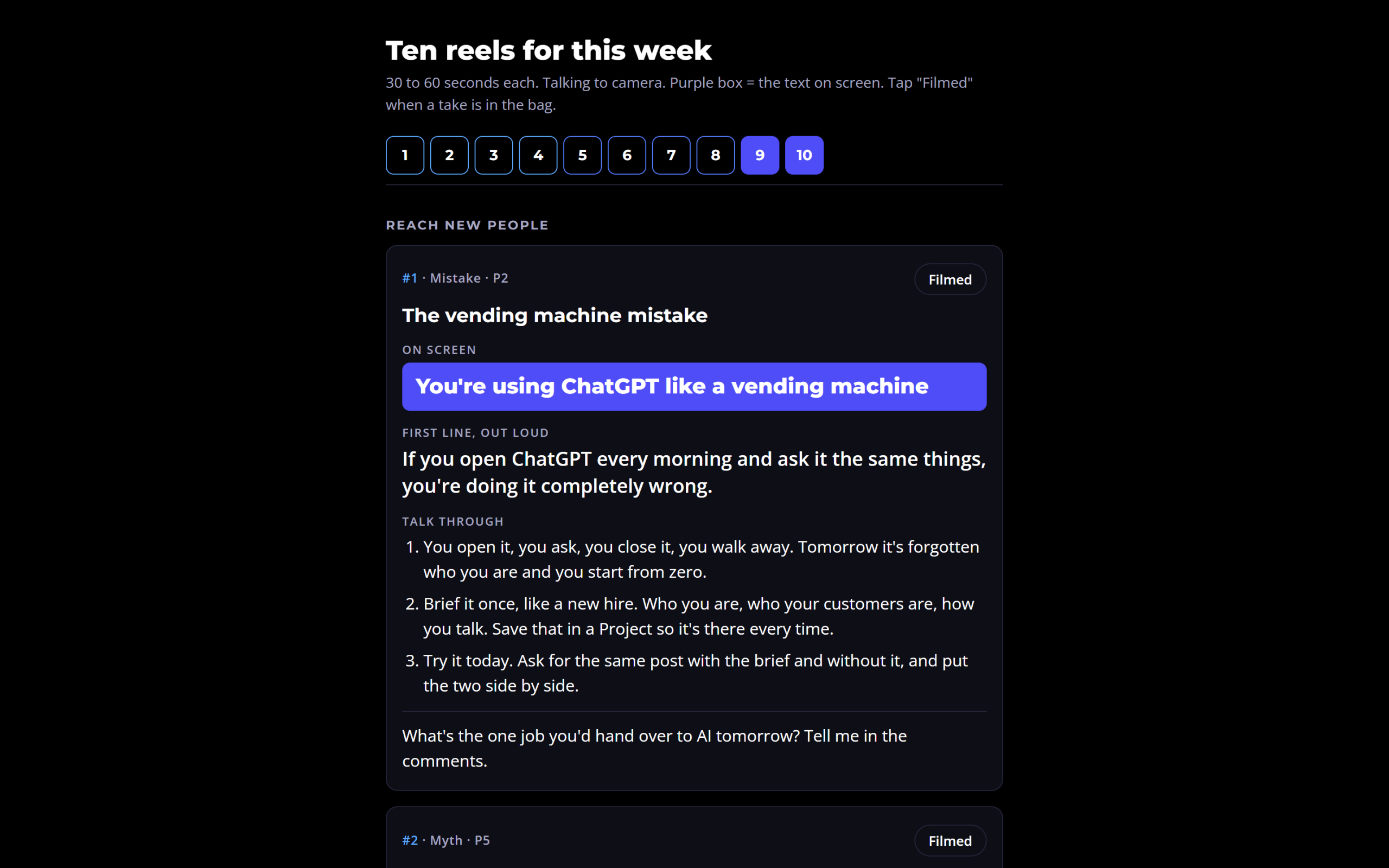
From that research, AI writes a filming sheet of 10 reels. Each reel gets the text that appears on screen, the first line I say out loud, and three talking points. Every reel is also tagged with its job: reaching new people, building trust, or selling.
A little back and forth pays off here. I reject ideas that do not sound like me, ask for replacements, and the sheet is ready in minutes.
Stage 2: Record (The Only Bit You Do)
Recording is the one stage AI cannot do for you. Your face and your voice are the part people trust.
I record all 10 reels in one sitting, each 30 to 60 seconds long. There is no studio. I work in a small room with the wall close behind me. AI blurs or replaces the background afterwards.
Here is how I keep batch filming fast:
- One setup. Phone or camera on a tripod, same light, same top. That way every reel looks like one consistent shoot.
- One take each. If I fluff a line at 25 seconds, I keep going. The mistake gets cut in the edit, so stopping and restarting only wastes the session.
- Work off the sheet. Tap "Filmed" as each reel is done, so you never lose your place.
Pro tip: Do not try to write new ideas during the recording session. Thinking and performing are two different jobs. If an idea comes to you mid-session, note it for next week's sheet and keep recording.
Stage 3: Edit (AI Does the Heavy Lifting)
Editing was the part I hated most before AI. I used to spend 15 minutes to half an hour editing a single short video, then post it and get 10 likes. That is the stage that stops most people posting.
Now I drop the recording into a folder and tell my AI assistant to run the edit skill on it. Claude Code then works through the footage. It does five jobs:
- It cuts the silences, retakes and mistakes, without cutting mid-word.
- It adds captions and the on-screen hook.
- It brings in graphics, pop-ups and screenshots that match what I am saying. If I mention The AI Marketing Hub, a picture of the community appears on screen.
- It shows me a live preview in the browser, so I can leave notes before anything renders.
- It renders the final file once I am happy.
Nothing goes out unwatched. A recent full edit was finished and rendered. Then I listened back, my voice sounded echoey, and it was recorded again. AI does the edit, but a human still has to watch it.
Stage 4: How 10 Reels Become 60 Posts
Repurposing is where batch content creation multiplies. You have already done the research, the recording and the edit. So the goal is to get every possible post out of that material, rather than letting each reel live once.
Each reel can feed four other formats, all built from the words I actually said:
- B-roll overlay videos. AI takes a 10-second clip from the raw recording, removes my voice, and lays text over it from what I said in that part of the reel. If a comment-keyword automation exists for a guide on that topic, it adds the keyword prompt too.
- Image posts. Either generated with Higgsfield, an AI image tool, or built entirely in code by Claude, from the message of the reel.
- Carousels. The same message broken into slides. You can even embed the reel itself inside the carousel.
- Text posts. For LinkedIn and Facebook, AI turns my words into a straight written post.
Each piece then gets a caption written for each platform, because LinkedIn and TikTok do not talk the same way. Ten reels, turned into several formats and posted to every platform each one suits, comes out at roughly 60 posts in a week. In other words, the 60 counts posts across platforms, not 60 separate ideas.
You do not need 60 ideas. You need 10, said out loud, and a system that does the rest of the maths.
Stage 5: Scheduling Without the Upload Grind
Scheduling is the stage people underestimate most. Uploading the same video six times, with six captions, to six apps, is where whole afternoons disappear.
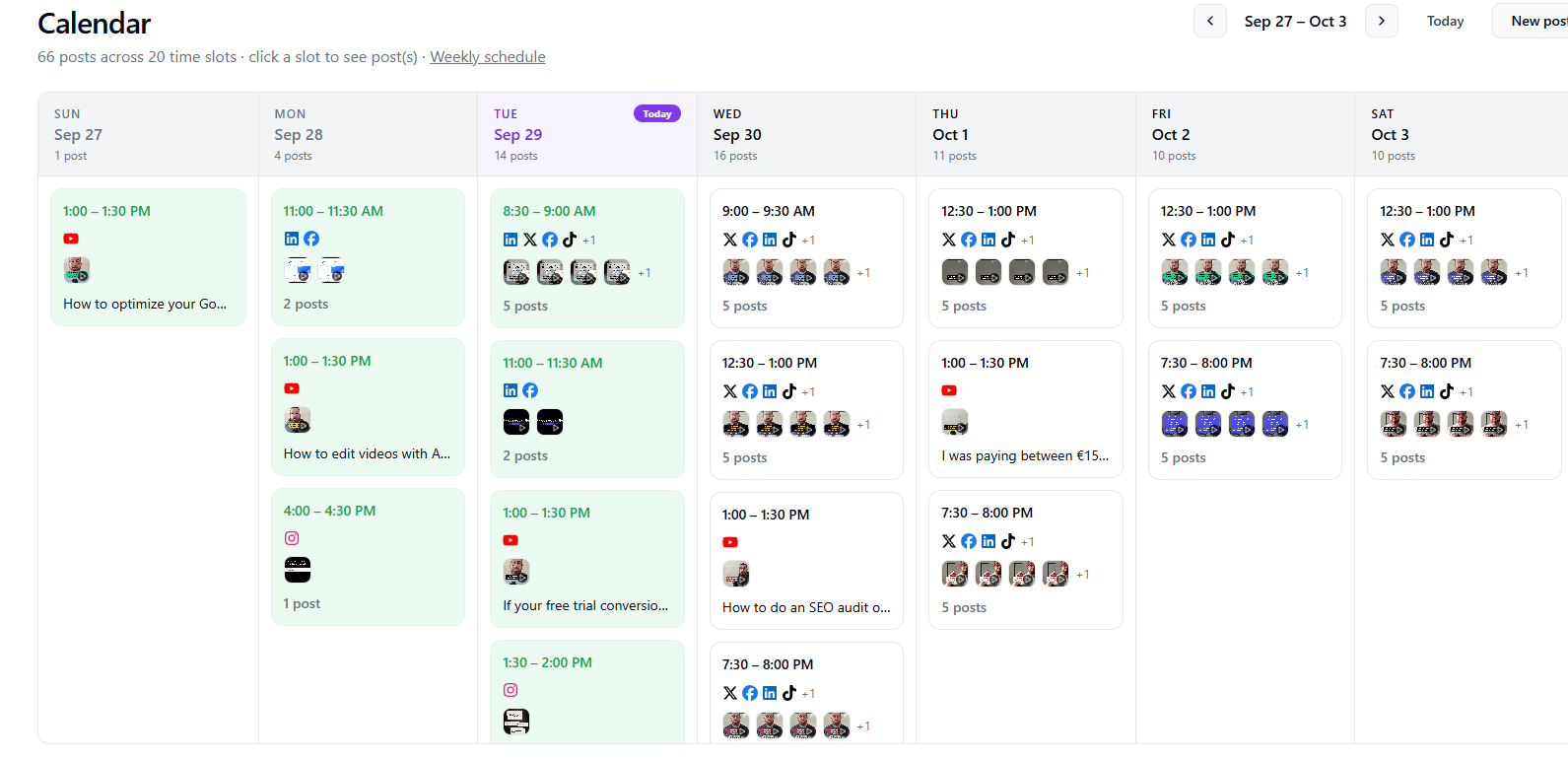
I use Blotato for this stage. Once the finished pieces land in their folder, I either give one instruction, "schedule the queue", or let it run on a timer. AI checks every caption, uploads the media, and books each piece onto every platform it belongs on. It also spreads posts across the week so the days are not bunched up. Finally, it logs every post in a sheet and runs a check to confirm nothing was missed.
For the manual version first, see how to schedule social media posts in advance.
What Batching Content Produced in 14 Days
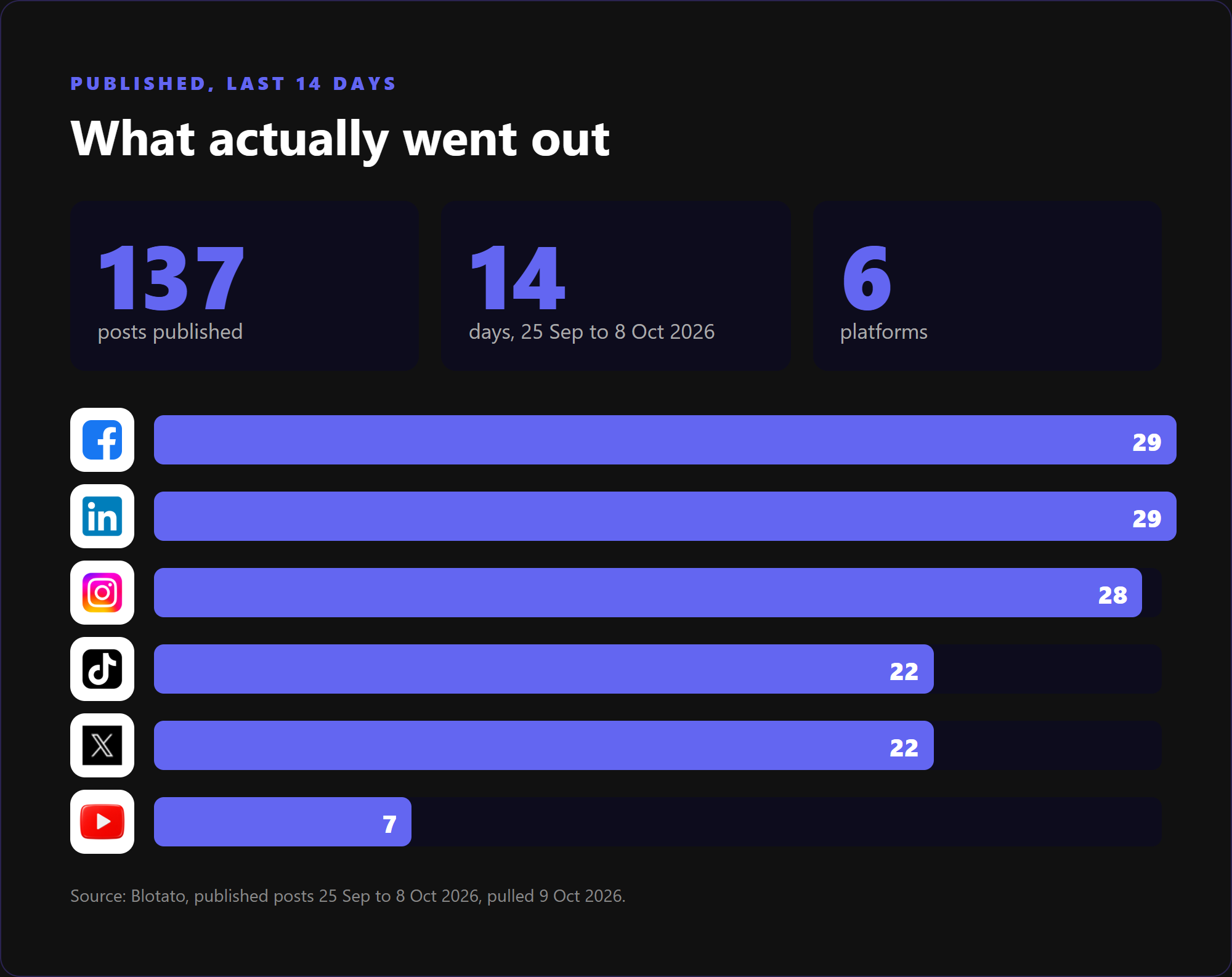
The receipts come straight from Blotato. Between 25 September and 8 October 2026, 137 posts were published across six platforms: Facebook 29, LinkedIn 29, Instagram 28, TikTok 22, X 22 and YouTube 7.
Something went out every day of those two weeks, from a single post on the quietest day to 19 on the busiest.
Volume Is Not Reach
Be clear about what that number is. 137 posts is how much went out, not what it earned. Volume gives ideas more chances to land. It does not replace a clear offer.
You are also not alone in reaching for video and AI to keep up. Wyzowl's 2026 video marketing survey found that 91% of businesses use video as a marketing tool. In addition, 63% of video marketers have used AI tools to create or edit their videos, up from 51% the year before. Among marketers who do not use video at all, 19% say it is because they do not have enough time. Batching is a direct answer to that last group.
Where Batching Content Breaks
Batching with AI is a system, not a magic button.
I am still the bottleneck, on purpose. If I do not sit down and record, nothing gets scheduled. As I write this, my queue is empty because I was busy and skipped the session. That is a cost I accept, because the alternative is worse.
AI from scratch is generic. I do not want AI creating content with no input from me. With no material of yours to work with, your posts look like anyone else's who asked the same tool the same thing. Your own information, thoughts, quirks and phrasing are what make the content stand out. AI should help you through the process, not replace the part that is you.
Every post still needs your eyes. The echoey edit above is the proof. Review everything before it is scheduled.
Who Should Not Batch 60 Posts a Week Yet
- If you do not know who you are talking to or what you sell. Sixty posts a week just spreads the confusion faster. Fix the offer first.
- If you will not check what goes out. Automation without review is how mistakes reach six platforms at once.
How to Start Batching Content This Week
You do not need the full AI setup to begin. Start with the habit, then add AI one stage at a time:
- Write down 10 questions your customers ask you. That is your first filming sheet.
- Block one session this week and record all 10 in one go. One setup, one take each, and keep moving.
- Pick one place to schedule from and fill a single week. Do not try to automate everything on day one.
- Add AI to the stage that hurts most. For most people that is the edit, then the repurposing.
FAQ
What does batching content mean?
Batching content means creating several posts in one focused session instead of making something new every day. You group the same type of work together: ideas in one block, recording in one block, editing and scheduling in their own blocks. As a result, you avoid the constant task switching that makes daily posting so tiring. You also stay ahead instead of scrambling each morning.
How many posts can you batch in one session?
It depends on how much you repurpose. I record about 10 short reels in one sitting. Then AI turns each one into b-roll videos, image posts, carousels and text posts, and every piece goes to each platform it suits. That comes to roughly 60 posts a week. Blotato's calendar for one recent week showed 66 posts across 20 time slots.
Is content batching worth it for a solo business owner?
Yes, provided you already know your audience and your offer. For a one-person business, batching is often the only way to post consistently. Nobody else covers the days you are busy. The catch is that it depends on you protecting one session a week. Skip it and the queue runs dry, so treat it like a client appointment.
Does batching content make posts feel dated?
Not if you batch evergreen material. Questions customers ask, mistakes you see, and how you do the work stay relevant for weeks. Keep time-sensitive news out of the batch and post it on the day instead. Because the ideas come from recent research and real comments, a weekly batch stays close to what your audience is asking right now.
Build Your Own Batching System
Batching content turned posting from a daily chore into one session a week for me. AI then took over the four stages around it. Start with the habit, add AI where it saves the most time, and keep your own voice at the centre.
The full system, with the skills, the setup and the step-by-step classroom breakdown, is inside The AI Marketing Hub. Start with a 7-day free trial and set it up at your own pace. If you get stuck, ask in the community and I will help.
Disclosure: Some links in this article are referral links. If you use one, I may earn a commission at no extra cost to you. I only link to tools I actually use.
How this was made: The facts, numbers and examples in this article come from my own work and videos. I use AI to help draft and structure the writing, then I review and edit every line myself before it goes live.

About the author
I'm Wayne St Ledger, and I run St Ledger Marketing. I started out in construction as a plasterer, then went on to a Bachelor's in Marketing and a Master's in International Business, which is where my bias toward results over talk comes from. I help business owners build marketing systems they actually understand, using AI in grounded, practical ways rather than hype. I also run a YouTube channel on marketing and AI, and The AI Marketing Hub, my own community for business owners and marketers putting AI to work properly.