
Claude Opus pricing just moved in a direction AI pricing almost never moves. Anthropic released Claude Opus 5.5 on 22 September 2026, and on its own announcement page it says the new model performs at the level of its top model, Fable 5.1, on most work while costing 40% less to run than Opus 5. A better model at a lower price is not the pattern anyone has got used to. Every other change in this space has gone the other way.
I run my whole business on Claude, so I went through the new rates line by line. This is what Opus 5.5 costs through the API, what that 40% does and does not mean if you pay for a monthly plan, what changed with usage limits, and whether any of it is a reason to move tools.
Claude Opus pricing at a glance
There are two ways to pay for Claude. You either pay a flat monthly plan and use it through the Claude apps, or you pay per use through the API, which is what a business plugs into its own tools, automations and agents. The headline price cut applies to the second one.
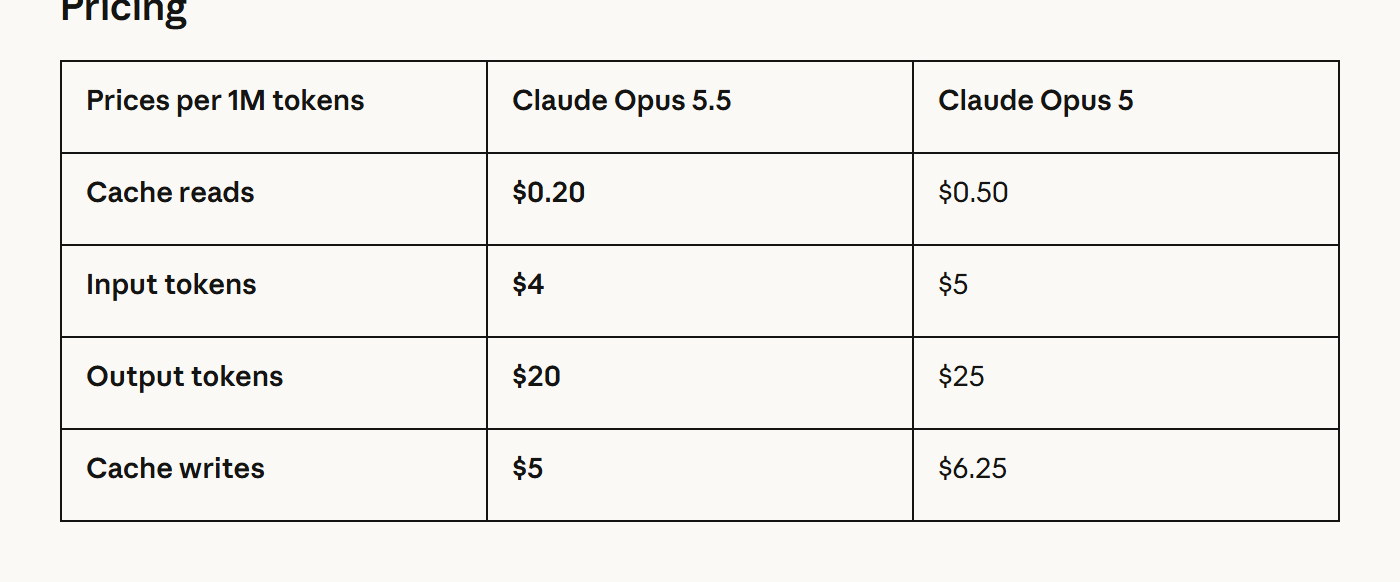
Here are the API rates Anthropic published for Opus 5.5 against the model it replaces. Every figure is in US dollars per million tokens.
| Per million tokens | Claude Opus 5 | Claude Opus 5.5 | Change |
|---|---|---|---|
| Input | $5 | $4 | 20% less |
| Output | $25 | $20 | 20% less |
| Cache reads | $0.50 | $0.20 | 60% less |
| Cache writes (5 minute) | $6.25 | $5 | 20% less |
| Batch input / output | Half price | $2 / $10 | Half the standard rate |
The batch line is worth knowing about. Anthropic's documentation puts batch processing at half price, so anything that does not need an answer immediately, like overnight report writing or bulk product descriptions, runs at $2 in and $10 out. There is also a fast mode for Opus 5.5 in Claude Code and on the Claude Platform at $8 per million input tokens and $40 per million output, for when speed matters more than cost.
Where the 40% actually comes from
If input and output only dropped 20%, where does 40% come from? Two places.
It uses fewer tokens to do the same job. Anthropic's wording is that Opus 5.5 "costs less per token than Opus 5 and uses fewer tokens per task, which nets out to a 40% drop in costs." A cheaper rate multiplied by less work is where the bigger number comes from. Box, one of the companies quoted on the launch page, said Opus 5.5 used a third of the tokens Opus 5 did on its evaluations, with answers 40% less verbose and no loss in accuracy.
Cache reads are the bulk of real work. Cache reads are the part of the bill where the model rereads context it has already seen, like your brand rules, your files or a long conversation. Anthropic describes them as the majority of the cost in agent and coding work, and that is the line that fell 60%, from $0.50 to $0.20. I have noticed this myself. You set a job running on the computer, walk away, come back to it, and you are paying again for everything it has to reread. That is the charge that just got much cheaper.
The fine print is important. Anthropic's claim is 40% less "at default settings" and "on typical workloads." If your workload is unusual, say very long outputs with almost no reused context, your saving will sit closer to the 20% base rate cut than to 40%. It will still be cheaper. It just will not be cheaper by the headline figure.
What it means if you pay for a monthly plan
This is the part most coverage skips, and it is where most small businesses sit.
If you are on Pro or Max, your bill does not change. The 40% is an API figure. Your monthly price stays the same. What changes is how much work fits inside it, because a model that uses fewer tokens per task stretches the same allowance further. You get more done for the same money rather than paying less.
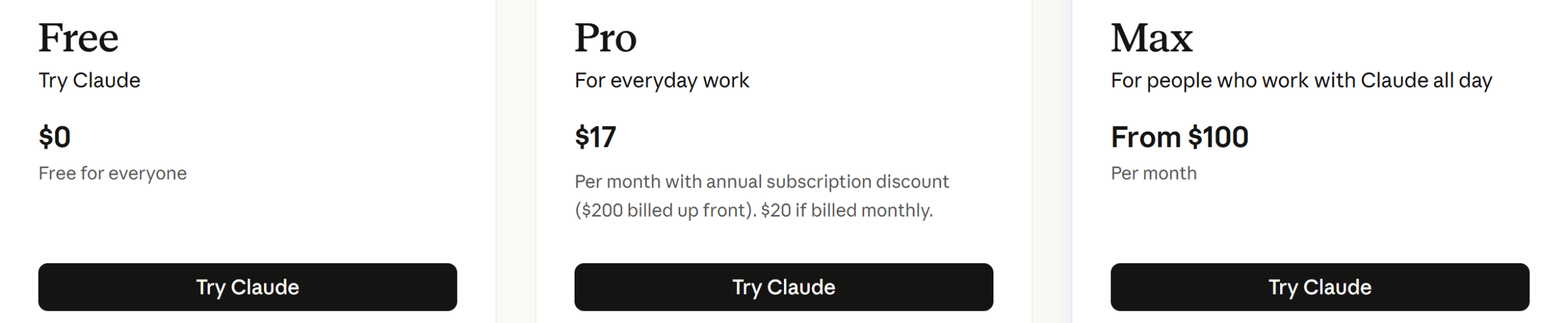
The plans on claude.com/pricing as of this week:
- Free: $0
- Pro: $20 a month billed monthly, or $17 a month with the annual discount ($200 billed up front)
- Max: from $100 a month, with a choice of 5x or 20x more usage than Pro
Which one should a business pay for? If you are one person using Claude for writing, research and planning, Pro is the sensible starting point. If you are running long jobs, building things, or hitting the five-hour limit most days, Max is the step up. If you are wiring Claude into your own tools or automations, the API rates above are the ones that apply, and that is where the 40% turns into a smaller invoice.
For more on getting set up in the first place, I have a separate guide on using Claude for small business.
Usage limits and the new saved reset
Alongside the price cut, Anthropic changed how much you can use on the paid plans. The exact wording on the announcement: "we're increasing five-hour usage limits on Pro, Max, Team, and seat-based Enterprise plans." Some headlines reported the five-hour caps as scrapped. They were not. They were raised.
A quick refresher on how the limits work. Paid plans have a five-hour session window and a weekly limit on top. Run out inside the five hours and you wait for the window to refresh. The weekly limit sits over everything.
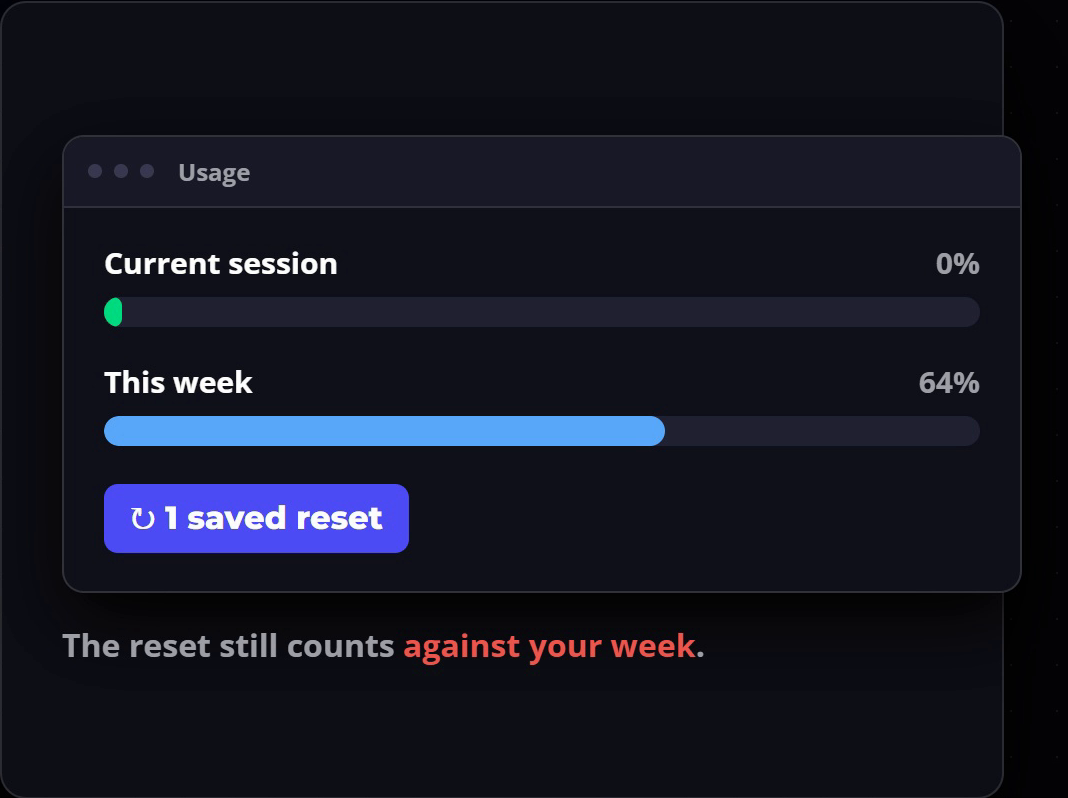
The new bonus is a saved reset. Every subscription user gets one rate limit reset they can save and use whenever they choose. Use it and your five-hour session goes straight back to zero.
The catch, and it is a real one: the reset still counts against your weekly limit. It gives you another session, not another week. I would have preferred it didn't come off the weekly allowance, but if you are in the middle of heavy work and need to finish it, it is still worth having. The reset is reported to be usable through 22 October. That date comes from third-party coverage rather than Anthropic's page, so check it in your own account under Settings, then Usage.
How I would use it: plan the job first, start building, then spend the reset on that job. Do not burn it on something you could have waited a few hours for. Personally I keep mine for the end of my weekly session, so I get the most out of the week without losing work to a wall.
What eats your Claude usage the fastest
Price and limits only matter relative to how fast you burn through them. Claude's own support page lists what drives usage up, and in my experience these are the ones that catch people:
- Long messages. Every extra paragraph you send is more to process.
- Big files dropped into long chats. A large file in a conversation that has already run for ages is the fastest way to empty a session.
- Long conversations. The model rereads the thread, so a chat that has gone on all day costs more with every reply. I am guilty of this one.
- Search and high effort settings. Web search and higher effort both add work behind the scenes.
- Multi-step tasks. Anything that runs code, creates files or browses websites uses a lot. My YouTube editing process is one long multi-step task, and it takes a good chunk of a session.
Starting a fresh chat for a new job, keeping reusable material in a project, and asking for the deliverable first all stretch the same allowance further. If you use Claude Code, I have a separate guide on cutting Claude Code token usage.
Is Opus 5.5 a reason to switch tools?
The honest answer from the benchmarks is that it is not a reason to switch to anything, and not a reason to switch away either.
Anthropic's own benchmark table puts Opus 5.5 next to Fable 5.1, Opus 5, GPT-6 Astra and GPT-5.6 Sol. Most of the rows are coding benchmarks, and most business owners are not using Claude to write code. The row that matters for a business is business workflows, measured on AutomationBench. Opus 5.5 scores 40.0% there. GPT-6 Astra scores 41.4%. That is effectively level.
On knowledge work, the test of real tasks across 44 occupations, Opus 5.5 scores 1846 against 1542 for Astra, which is a clear lead. Anthropic also says that on that test, Opus 5.5 at its default setting beats Astra at its maximum setting for about a fifth of the cost per task.
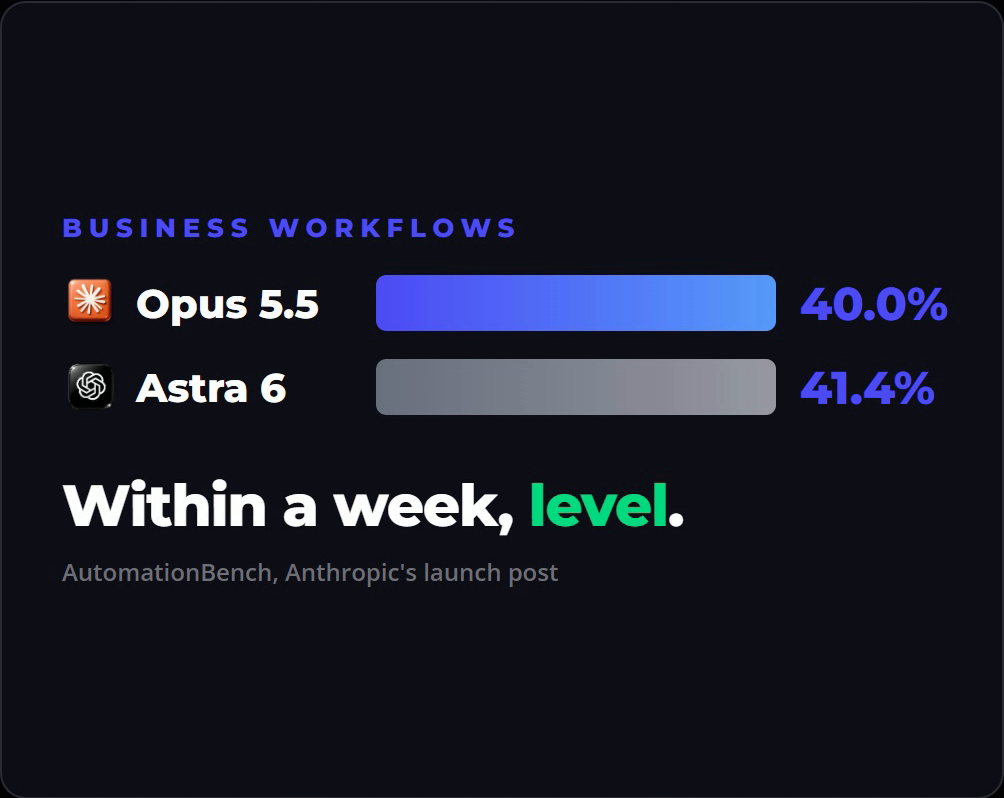
I was very close to moving over when Astra 6 came out. I decided to hang on and see, and a week later the gap had closed. That is going to keep happening. Most of these models are heading to the same place, and whichever one is ahead this week will be level or behind next week.
What does not reset every week is your setup. My business runs on 43 Claude skills and one file structure, and every one of them got better overnight without me rebuilding anything. Switching would mean rebuilding my prompts, files and habits for a benchmark that is a point and a half apart. The people who cancelled Anthropic for the other side last month are already writing about coming back. The tool you have already built on gets better underneath you, and that is worth more than a small lead on one chart.
It is still worth setting your business up so a move is possible if you ever genuinely need one. Keep your instructions, brand rules and processes in plain files rather than buried inside one app.
Where Opus 5.5 still falls short
Cheaper does not mean unsupervised. The team at Every tested it for a week and published their tips, and a few are worth knowing before you hand it a big job.
It will not always stop on its own. Set a budget and a stopping point, and tell it what done looks like. Without that it can keep going and eat a lot of your weekly limit. On the API the equivalent is a real bill.
It still marks its own homework. Ask it to create something and then grade it, and it can score its own work poorly. That does not mean the work is poor. It means you cannot hand the checking to the same model that did the writing. Keep your own review step.
Do not assume the output is bang on. If you are on a deadline, or working to a strict brand template, treat it like any model: let it do the heavy lifting, then check what it got right, what it got wrong, and fix the rest yourself.
Frequently asked questions
How much does Claude Opus 5.5 cost? Through the API, Claude Opus 5.5 costs $4 per million input tokens and $20 per million output tokens, with cache reads at $0.20 and batch processing at $2 and $10. On a monthly plan it is included in Pro ($20 a month, or $17 billed annually) and Max (from $100 a month).
Is Claude Opus 5.5 cheaper than Opus 5? Yes. Input and output rates are 20% lower, cache reads are 60% lower, and Anthropic says the combined effect on typical workloads at default settings is 40% less to run, because Opus 5.5 also uses fewer tokens per task.
Does the 40% saving apply to Claude Pro and Max? No. The 40% applies to API usage. Pro and Max prices are unchanged. On a subscription the benefit shows up as more work per session, helped by the increased five-hour limits.
Did Claude increase its usage limits? Yes. Anthropic raised five-hour usage limits on Pro, Max, Team and seat-based Enterprise plans, and gave subscription users one saved rate limit reset. Weekly limits still apply.
What is the Claude saved rate limit reset? It is a one-time reset you can use whenever you choose to bring your current five-hour session back to zero. It still counts against your weekly limit, so it buys another session rather than another week.
Should I switch from ChatGPT to Claude, or the other way, because of Opus 5.5? Probably not on price or benchmarks alone. On Anthropic's business workflow test, Opus 5.5 and GPT-6 Astra are within 1.4 points. The bigger cost is rebuilding your setup, so stay on the tool you have built on unless something you need genuinely is not possible there.
Where to start
If you are already on Claude, there is nothing to migrate. Open the model menu, pick Opus 5.5, and save your reset for one big job, like a website rebuild, a month of content or a full audit. Start every big task by telling it what done looks like.
If you are paying through the API, the new rates apply straight away and the cache and batch lines are where the real savings sit. And if you want help setting Claude up properly for your business on one tool, instead of chasing whichever model launched this week, that is what we work on inside The AI Marketing Hub. There is a 7 day free trial to look around before you commit to anything.
Disclosure: Some links in this article are referral links. If you use one, I may earn a commission at no extra cost to you. I only link to tools I actually use.
How this was made: The facts, numbers and examples in this article come from my own work and videos. I use AI to help draft and structure the writing, then I review and edit every line myself before it goes live.

About the author
I'm Wayne St Ledger, and I run St Ledger Marketing. I started out in construction as a plasterer, then went on to a Bachelor's in Marketing and a Master's in International Business, which is where my bias toward results over talk comes from. I help business owners build marketing systems they actually understand, using AI in grounded, practical ways rather than hype. I also run a YouTube channel on marketing and AI, and The AI Marketing Hub, my own community for business owners and marketers putting AI to work properly.