How to Repurpose YouTube Videos Into LinkedIn Posts (Full Workflow)
You are sitting on a goldmine of content and you probably do not realise it. Every YouTube video you have ever published is a month of LinkedIn posts waiting to be pulled out, and most people leave all of it on the table.
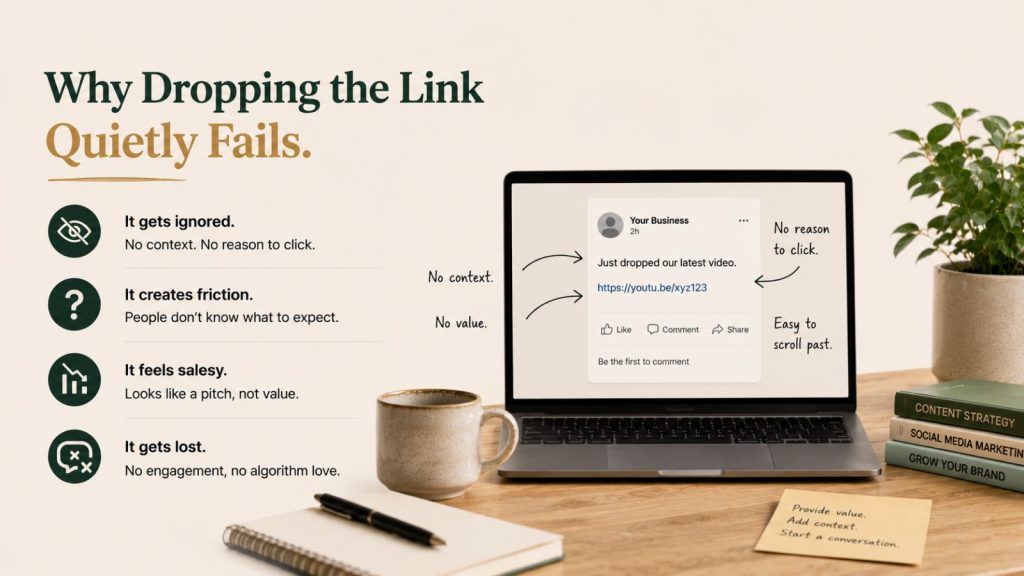
Here is what most business owners do instead. You upload a new video, copy the link, head over to LinkedIn, paste it, write “new video just went live,” and hope for the best. Link slapped, fingers crossed. It almost never works, because nobody on LinkedIn wants to leave their feed to sit through a 20-minute video from someone they have only just met.
This is the exact workflow I use to repurpose YouTube videos into LinkedIn posts, the same one I used to grow my own account by 23 followers and 5.8% in a single week from a standing start. Small numbers, but real ones, off the back of content I had already made. Here is the full walkthrough on video:
Why Dropping the Link Quietly Fails
LinkedIn does not want to send people off LinkedIn. That is the single fact that breaks the “post the link and hope” approach. When you drop a YouTube link into a post, you are asking the platform to push traffic to a competitor, and the algorithm responds by limiting how far that post travels.
The data backs this up. Native video uploaded straight to LinkedIn earns far more engagement than a post that links out, and short-form clips under 60 seconds pull around 1.4 times the reach of longer formats, according to Socialinsider’s 2026 LinkedIn benchmarks. A raw YouTube link is the worst of both worlds: it leaves the platform and it demands 20 minutes of attention up front.
There is a second problem. A 20-minute video is one piece of content posted once. The person who scrolls past it that morning never sees it again. But the same video holds ten or fifteen distinct ideas, and each of those, posted as its own LinkedIn piece across the month, is another chance to land with someone who would never have pressed play on the full thing.
That is the shift. Stop thinking of your video as one post. Start thinking of it as raw material for a month.
What Repurposing Actually Means Here
Before the workflow, clear up the misconception. Repurposing your video for LinkedIn is not chopping it into clips and captioning them “part 1, part 2, part 3.” That is slicing, not repurposing, and your audience can feel the difference.
Real repurposing takes the ideas inside one video and rebuilds them in the formats LinkedIn actually rewards: native short clips, text posts, carousels, and the occasional lead magnet. The source idea is shared. The execution is native to the feed every time.
Think of it the way cinemas treat a film. You never see the whole movie posted online before release. You see trailers, stills, and short scenes, each one built to make you want the full thing. Your YouTube video is the movie. LinkedIn is where the trailers run.
The Workflow: One Video, a Month of LinkedIn Content
Here is the system that replaces the link-and-pray habit. The recording is still on you. Everything downstream is handled by an AI system that reads my brand first, then produces each format.
Step 1: Record One Solid Anchor Video
The anchor is the foundation, and it is the one part AI cannot do for you. A weak video produces weak posts, and no amount of clever repurposing fixes thin source material. A 10-minute video realistically gives you 10 to 12 LinkedIn pieces. A 20-to-30-minute video gives you 30-plus without repeating yourself. Record around a topic you actually want to be known for.
Step 2: Transcribe It Into an SRT
The transcript is the key to everything that follows. Once the video is done, it gets transcribed into an SRT file, which is a timestamped text version of everything you said. That timestamping is what lets the system later cut clips to the exact second without you scrubbing a timeline by hand.
Step 3: Hand the Video to the AI System
This is where the work collapses into minutes. I hand the video and its SRT to my agents in Claude. The system loads my brand information first, my voice, my pillars, and my calls to action, then it pulls the angles, reviews them, and drafts the posts. I am not starting from a blank page; I am steering one.
From a single video it produces several distinct LinkedIn assets:
- Hook trailers — the strongest opening 30 to 60 seconds, cut clean for the top of the funnel
- Moment clips — three or four standout moments, each on a different angle and hook, all from the same recording
- Captioned native clips — short video sized and subtitled for the LinkedIn feed, not a link to elsewhere
- Text posts — the key ideas rewritten for people who would rather read than watch
- A lead magnet — the framework from the video condensed into something people comment a word to receive
Because the system is built on the SRT, you can tell it exactly what you want: 15-second cuts, 30-second cuts, different angles, different hooks. It clips them all to spec.
Step 4: Approve, Do Not Build
The manual method has you editing every clip and writing every caption. This method has you reviewing them. I keep guardrails in place so I stay in control of what goes out, but I am approving and adjusting, not designing from scratch. That single mindset shift is where the hours actually disappear.
Step 5: Space It Across the Month
You now have a month of LinkedIn content from one recording. The last step is spacing it out so it drips rather than dumps. A hook trailer one day, a text post two days later, a moment clip after that, the lead magnet when the topic has had a run. The video you recorded once keeps working for weeks instead of vanishing after a single morning.
Map Every Piece to a Funnel Stage
The reason this beats random posting is that each format does a specific job. Repurposing one video for LinkedIn lets you feed the whole funnel from one recording instead of guessing.
Top of funnel — reach. Hook trailers, moment clips, and captioned shorts are built to travel. Their job is to get in front of people who have never heard of you. Short native clips are what the algorithm currently pushes hardest, so this is where most of your raw video should go.
Middle of funnel — trust. Longer text posts, story posts, and framework breakdowns sit here. These are for the people the clips already reached, the ones now deciding whether you actually know your subject. The same video that gave you a 30-second hook gives you a 200-word framework post.
Bottom of funnel — capture. The lead magnet lives here. The framework from your video, condensed into a resource people comment a keyword to receive, turns passive viewers into contacts you can actually follow up with.
One video, three funnel stages, weeks of posts. That is the whole point of treating the recording as raw material rather than a finished post. For the wider system behind this, see our content repurposing system guide, and for the full menu of formats one video can become, the ten ways to repurpose content from one video.
Why Consistency Is the Real Prize
Speed is the obvious win. Consistency is the one that compounds. LinkedIn’s algorithm rewards showing up, and companies posting at least once a week see roughly double the engagement of those who post in bursts and then go quiet, per Martal’s 2026 LinkedIn benchmarks. The optimal cadence sits around three to five posts a week.
For a business owner doing their own marketing, that cadence is impossible to sustain from scratch. It becomes easy when one recording already holds a month of posts. You are not manufacturing content every morning under pressure; you are spacing out work you have already banked. That is the difference between LinkedIn being a daily emergency and a weekly project.
The big players have understood this for years. Gary Vaynerchuk records once and his team repurposes it across every platform. Alex Hormozi builds long-form content and breaks it down into clips and posts that run for weeks. It is the same material, repackaged for the audience and the platform. You are doing exactly that, with an AI system standing in for the team.
Three Mistakes That Keep People Posting Links
Plenty of business owners have tried to get more out of their videos on LinkedIn and given up. It usually comes down to one of three mistakes.
The first is posting the raw link with a generic “new video out now.” It leaves the platform, demands 20 minutes, and the algorithm buries it. The fix is native: upload short clips straight to LinkedIn and let the link live in a comment, if anywhere.
The second is treating the AI like a vending machine. You paste a transcript, ask for posts, and accept whatever generic text comes back. The output reads as nothing because you gave it nothing about your brand. Load your voice, your pillars, and your calls to action once, so every piece is built against your rules.
The third is still editing every clip by hand after the system has done the thinking. People let the AI draft the cuts, then rebuild them in an editor anyway, and the saved time quietly creeps back in. Approve the finished clip instead of remaking it.
Avoid those three and the workflow holds. Fall into any of them and you are back to slapping links and hoping.
What This Is Not
Two honest caveats. First, this is not fully hands-off. You still record the anchor video, and its quality sets the ceiling for everything that comes off it. Garbage in, garbage out still applies.
Second, repurposing does not replace a LinkedIn strategy, it amplifies one. If you do not know which topic you are building authority around, the system will produce a steady stream of posts that go nowhere. Know your pillar first, then let one video feed it for a month. If scheduling the batch is your bottleneck rather than creating it, that is a separate fix, covered in how to automate social media posting.
FAQ
How do I repurpose a YouTube video into LinkedIn posts?
Record one solid anchor video, transcribe it into an SRT file, then run that transcript through an AI system that knows your brand. It produces native short clips, text posts, and a lead magnet, each rebuilt for the LinkedIn feed rather than linked out. You approve the output instead of editing it by hand, then space the pieces across the month.
Why not just post the YouTube link on LinkedIn?
Because LinkedIn limits the reach of posts that send people off the platform, and a 20-minute video demands too much attention from someone who just met you. Native video uploaded straight to LinkedIn earns far more engagement than a link post, and short clips under 60 seconds pull around 1.4 times the reach of longer formats.
How many LinkedIn posts can one video produce?
A 10-minute video realistically gives you 10 to 12 distinct LinkedIn pieces. A 20-to-30-minute video can produce 30-plus before you start repeating yourself, once you count hook trailers, moment clips, text posts, and a lead magnet drawn from the same recording.
How often should I post the repurposed content?
Aim for three to five posts a week, which is the range LinkedIn’s algorithm rewards most. Posting at least once a week is the floor; accounts that show up consistently see roughly double the engagement of those that post in bursts and disappear. One repurposed video makes that cadence sustainable.
Do I need expensive software to do this?
No. The core is one AI tool that reads your brand context and rewrites your video into LinkedIn-native formats. You can transcribe for free and add a scheduler as you grow, but if budget is tight, start with the AI writing layer and post the batch manually while you build the habit.
Start With One Video You Already Have
You do not need to record anything new to start. You almost certainly have a video sitting on your channel right now that is one transcript away from a month of LinkedIn content. The hard part, making it, is already done. All that is left is getting it out there in the formats LinkedIn actually rewards.
If you want to see exactly how this system is built, including the prompts, the brand setup, and the full workflow, it is all documented inside the Marketing Hub, Ireland’s growing Marketing and AI community. Comment HUB or follow the link, and you can build the same system for your own business.